
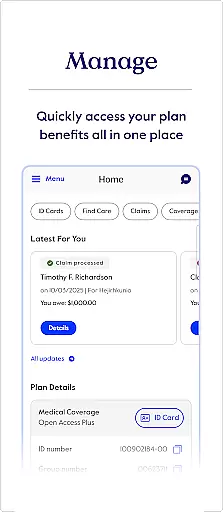
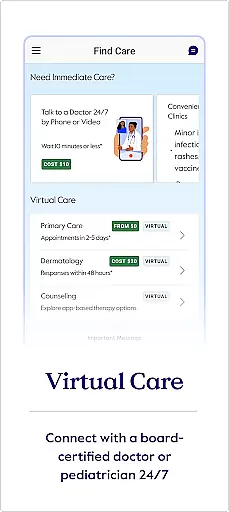
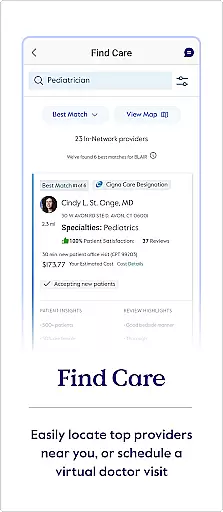
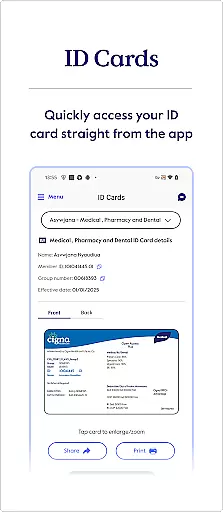
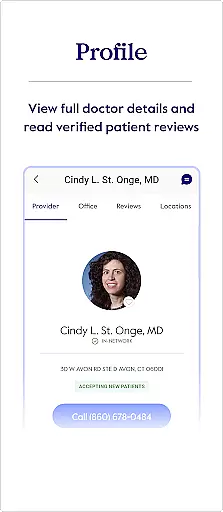
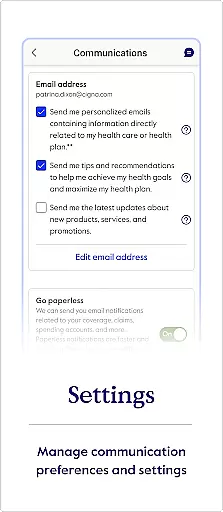
myCigna is a comprehensive health management app designed for Cigna customers. The app provides easy access to essential health information, allowing users to manage their healthcare needs efficiently. With myCigna, you can view and share ID cards, find care providers, track claims, and monitor account balances.
The app also offers features such as prescription management, coverage details, and wellness tracking. Whether you need to refill a prescription or check what's covered under your plan, myCigna has got you covered. Available in both English and Spanish, this app ensures that language is not a barrier to managing your health effectively.
myCigna stands out with its robust set of features tailored to enhance user experience. One key feature is the ability to quickly view and share ID cards directly from your mobile device, making it convenient during doctor visits. Additionally, the Find Care function allows users to search for healthcare providers within Cigna's network, comparing quality ratings and costs.
Another significant aspect is the detailed claims management system where users can view past and recent claims effortlessly. The app also supports pharmacy services like viewing and refilling prescriptions, updating preferences, and checking coverage details. These features collectively ensure that users have all necessary tools at their fingertips for effective health management.
Personalized planning in the myCigna app offers users a tailored approach to managing their health and wellness. This feature is crucial as it adapts to individual health needs, ensuring that each user receives relevant information and support.
The app achieves personalized planning through features like viewing goal activity and awards within the Wellness section. Users can track their progress towards personal health goals, which are often linked to their specific coverage plans. This allows for an adaptive experience that evolves with the user's health journey.
Users benefit from this feature by gaining insights into their health routines and understanding how well they align with their insurance coverage. The ability to see what is covered under their plan and review plan deductibles and maximums ensures they make informed decisions about their healthcare.
This level of personalization not only enhances user engagement but also promotes better health outcomes by keeping users motivated and informed about their wellness activities and achievements.
Progress visualization is a key component of the myCigna app, providing users with clear and accessible ways to monitor their health-related activities and achievements. Visual representation of data is important because it simplifies complex information, making it easier for users to understand their progress at a glance.
In the myCigna app, progress visualization is evident when users view goal activity and awards within the Wellness section. The app presents data such as recent and past claims, health fund balances, and prescription refills in an organized manner, allowing users to easily comprehend their current health status and financial commitments.
By utilizing progress visualization, users can maintain better control over their healthcare expenses and wellness milestones. They can quickly identify trends or areas needing attention, such as recurring medical costs or medication schedules, leading to more proactive health management.
Ultimately, progress visualization empowers users by giving them tangible evidence of their health journey, reinforcing positive behaviors and encouraging continued adherence to beneficial health practices.
User-friendly interface
Comprehensive health tracking
Multi-language support
Efficient claims management
Convenient prescription handling
Limited to Cigna customers
Feature availability varies by coverage
No offline functionality
Occasional syncing issues
Requires internet connection

The Wear OS BeechBand app is designed to alleviate anxiety and other conditions
 4.1
4.1
Insanity blocks of intense physical activity, short breaks of 30 seconds.
4.0
Optimization for TRT & Enhanced Athletes
4.5
Effortlessly and naturally release anxiety by harnessing the power of your brain
4.60
FitCloudPro takes care of your health every minute.
3.70
Your personal BP tracking companion, focus on helping you achieve wellness goal.
4.10
The most accurate heart rate app to monitor and track your heart rate & pulse.
4.40
Jogging app for calorie counter and distance tracker. Running app to lose weight
4.20
Mood journal, habits, self-care tracker, self-love
4.90
Power-lifting, weightlifting and Wendler 531 app to track your workout program.
4.90
Easy to use step counter, calorie counter helps lose weight, count steps offline
4.80
Track heart rate & HRV in 30s! Get live health insights and anomaly alerts
4.40
Fast Body building & Weight Loss. Home Workouts with Daily Coach, No Equipment.
4.30
Pupillary distance PD with camera quick and easy, checking glasses frames on you
3.70
GloryFit is a companion app for the smart bracelet.
3.60
Live Heart Rate Pro - Real Time Heart & Workout Data For Wear OS & Bluetooth BLE
3.20
Measure real-time wrist & ambient temperature with your Galaxy Watch (Wear OS)
3.20
Sync your activities of the most popular sports tracking services
2.70
Transform your body and soul with DBFFitness, with a 40-day fitness journey.
4.3


User Reviews