

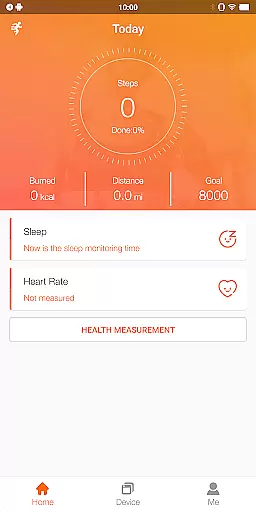
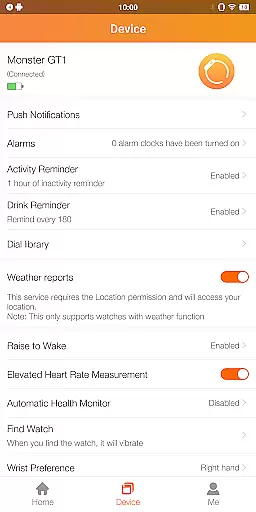
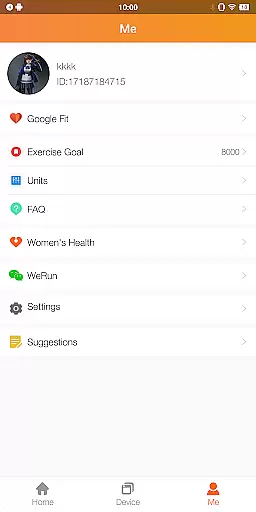
FitCloudPro is a comprehensive health and fitness application designed to seamlessly connect your smartwatch with your mobile device. This app allows you to manage and control various functions of your Kumi smartwatch, enhancing your wearable experience.
The app supports an array of features including health data monitoring such as steps, calories, sleep patterns, heart rate, and blood oxygen levels. Additionally, it offers rich message notifications for calls, SMS, and social media platforms, alongside customizable watch faces to match your personal style.
FitCloudPro stands out with its extensive functionality tailored for health and fitness enthusiasts. The app provides real-time health tracking by monitoring vital metrics like heart rate, blood oxygen, and sleep quality, ensuring you stay informed about your wellness journey.
Beyond health tracking, the app delivers timely notifications for calls, messages, and social media interactions, allowing users to stay connected without reaching for their phones. With various customizable watch faces, FitCloudPro lets you personalize your smartwatch to reflect your mood or style preferences.
Personalized planning in FitCloudPro refers to the app's ability to create tailored health and fitness plans based on individual user data. This feature is crucial as it allows users to receive customized recommendations that suit their specific needs and goals.
The application collects various health metrics such as steps, calories burned, sleep patterns, heart rate, and blood oxygen levels. Using this data, FitCloudPro generates personalized plans that may include daily step goals, optimal times for exercise, and reminders for maintaining an active lifestyle.
Users benefit from this feature by gaining insights into their health trends and receiving actionable advice to improve their well-being. The personalized nature of these plans ensures they remain relevant and achievable, thus enhancing user engagement and motivation.
Ultimately, personalized planning empowers users to take control of their health journey with a clear roadmap designed just for them, leading to better adherence to fitness routines and improved overall health outcomes.
Progress visualization within FitCloudPro involves presenting users' health and fitness data in an easily digestible graphical format. This aspect is vital because visual representations make complex data more accessible and understandable at a glance.
FitCloudPro offers various charts and graphs that display progress over time, such as line graphs for tracking changes in weight or bar charts for comparing weekly activity levels. Users can also view detailed reports that break down their performance across different metrics like heart rate zones or sleep stages.
This functionality helps users stay motivated by providing tangible evidence of their achievements and areas needing improvement. Seeing consistent progress through visuals reinforces positive behaviors and encourages continued effort towards fitness goals.
By offering comprehensive progress visualization tools, FitCloudPro not only enhances user experience but also fosters long-term commitment to health and wellness objectives, making it easier for individuals to maintain healthy habits.
User-friendly interface
Comprehensive health tracking
Customizable watch faces
Rich notification system
Seamless device integration
Limited to Kumi smartwatches
Requires multiple permissions
No medical-grade accuracy
Potential battery drain
Dependent on smartphone connection

Pack of 66 calming lullabies for smooth fall asleep and relaxation
 4.10
4.10
Period Tracker, the easiest way to track your periods!
4.50
A simple way to calculate peptide doses and also to convert different units.
4.1
Histamine intolerance, low FODMAP diet and irritable bowel syndrome (IBS)
4.00
Binaural Beats - Fully Customizable Waves - Pure Sound - No Loops
4.50
Using Recognise™ has been shown to reduce pain, and improve performance.
4.1
The OFFICIAL Couch to 5K® running training app! A 9 week walk-run workout plan.
4.50
FODMAP, Gluten, Allergy, Vegan
4.50
GloryFit is a companion app for the smart bracelet.
3.60
Weight loss app: home workout for women to lose weight & burn calories.
4.80
Raccoon AI Calorie Counter. Intermittent Fasting & Timer. Macro, Carb, Protein
4.50
Point, scan, and unlock truth in every bite.
4.50
Grow with self-tests and personal routine.
4.30
Understand your body’s most meaningful messages and transform your health.
3.90
Control your sleep in real-time wearing Garmin device
3.60
The Sleep Miracle Sound Machine: Soothes baby to sleep with a gentle "Shhh"
3.00
Sync your activities of the most popular sports tracking services
2.70
Transform your body and soul with DBFFitness, with a 40-day fitness journey.
4.1
Using Recognise™ has been shown to reduce pain and improve performance
4.0


User Reviews