
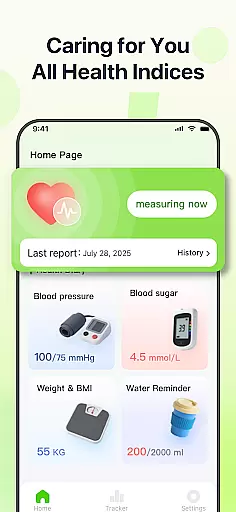
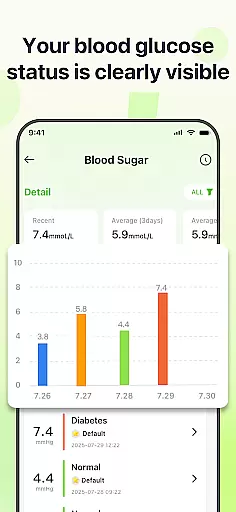
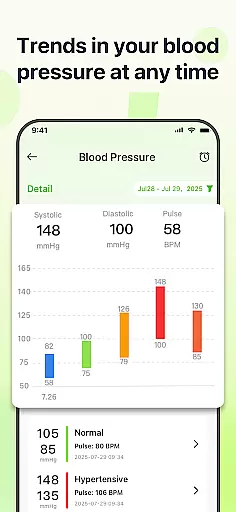
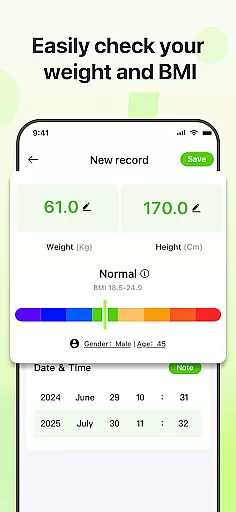
PulseSense is a comprehensive health tracking application designed to simplify wellness management. The app allows users to effortlessly log key health metrics such as blood pressure, glucose levels, and heart rate. Its standout feature is the ability to generate intelligent health reports and personalized recommendations based on user data. With sleek trend visualizations spanning days to years, PulseSense helps users uncover patterns and track progress over time.
Designed with privacy in mind, the app ensures all data stays on the device with end-to-end encryption, making it an ideal choice for individuals managing chronic conditions like hypertension or diabetes. Whether you're a senior, a caregiver, or someone focused on fitness goals, PulseSense offers a secure and intuitive platform to consolidate health metrics without needing multiple tools.
PulseSense stands out with its effortless logging system that supports various health metrics including blood pressure, glucose levels, and heart rate. Users can attach personal notes and custom tags to their entries, adding valuable context to their records. The app's intelligent reporting feature provides tailored lifestyle recommendations based on individual health data, helping users make informed decisions about their wellness journey.
Another notable feature is its advanced visualization tools. PulseSense offers sleek graphs and charts that display trends over days, weeks, months, and years, enabling users to identify long-term patterns easily. Privacy is prioritized through end-to-end encryption, ensuring no data leaves the device. Additionally, customizable reminders help reinforce healthy habits, while the app consolidates all essential health metrics into one place, eliminating the need for multiple tracking tools.
Personalized planning in health applications refers to the ability to tailor health goals and routines based on individual user data. PulseSense excels in this area by offering intelligent health reports and personalized lifestyle recommendations.
The app analyzes logged metrics such as blood pressure, glucose levels, and heart rate to generate customized insights. These recommendations are designed to help users manage chronic conditions like hypertension or diabetes more effectively.
Users benefit from a more engaging and relevant wellness journey. By receiving tailored advice, they can make informed decisions about their health and stay motivated to achieve their fitness milestones.
This feature underscores PulseSense's commitment to not just tracking health but enhancing overall well-being through actionable insights.
Progress visualization is crucial for understanding health trends over time. PulseSense offers sleek trend visuals that span days, weeks, months, and years, making it easier for users to track their wellness journey.
The app provides intuitive graphs and charts that display patterns in blood pressure, glucose levels, and other metrics. This visual approach helps users uncover insights that might be missed with raw numbers alone.
With these visual tools, users can set reminders to reinforce healthy habits and monitor improvements or declines in their health metrics. This keeps them informed and consistent in managing their health.
By consolidating all health metrics into one visually coherent interface, PulseSense ensures users have a clear and comprehensive view of their progress, aiding in better health management.
User-friendly interface
Advanced health insights
Strong privacy controls
Customizable reminders
Comprehensive metric tracking
No cloud backup option
Limited medical device integration
Requires manual data entry
Premium features may cost extra
Not a substitute for medical advice

Effortlessly and naturally release anxiety by harnessing the power of your brain
 4.60
4.60
Protect your healthy sleep
4.80
Fast Body building & Weight Loss. Home Workouts with Daily Coach, No Equipment.
4.30
Looking to take control of your health? Our psychology-based programs can help.
4.10
Pedometer that gives you sweatcoins for steps. It pays to walk!
4.10
Jogging app for calorie counter and distance tracker. Running app to lose weight
4.20
Monitor blood sugar, gain insights, and manage diabetes with ease.
3.20
Workouts for everyone
4.70
Comprehensively record and manage your health
4.50
Show your support for the development of FitNotes - Gym Workout Log
4.90
Home workouts for fitness & fast bodybuilding at home - no equipment needed.
4.90
The simplest way to track your 21 Day Program containers, exercises, and water.
4.50
Period Tracker, the easiest way to track your periods!
4.50
Pilates, Calisthenics, Yoga
4.50
Get alert about getting out of desired heart rate zone.
4.10
Track sleep cycle, relax with white noise, sleep sounds & smart alarm clock
3.80
Dexcom G7 Continuous Glucose Monitoring
3.70
Control your sleep in real-time wearing Garmin device
3.60
Transform your body and soul with DBFFitness, with a 40-day fitness journey.
4.1


User Reviews