
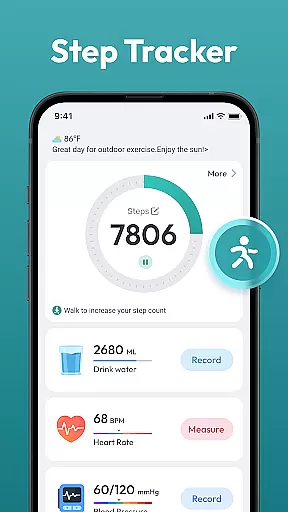
Step Counter - Pedometer App is a comprehensive health and fitness tool designed to help users track their daily physical activity. This app automatically counts steps and measures distance traveled, making it ideal for those looking to monitor their walking or running routines.
In addition to basic step counting, the app offers advanced features such as daily, weekly, and monthly activity charts, training courses, and personalized plans. These tools are particularly useful for individuals aiming to lose weight, improve their overall health, or achieve specific fitness goals like reaching 10,000 steps per day.
The app's compatibility with most Android devices and its user-friendly interface make it accessible to a wide audience. Whether you're a fitness enthusiast or just starting your health journey, Step Counter - Pedometer App provides valuable insights into your daily activities without requiring any wearable devices.
Step Counter - Pedometer App stands out with its automatic step counting feature, which ensures accurate tracking without manual input. The app supports various health data metrics, providing users with a holistic view of their fitness progress through detailed charts and statistics.
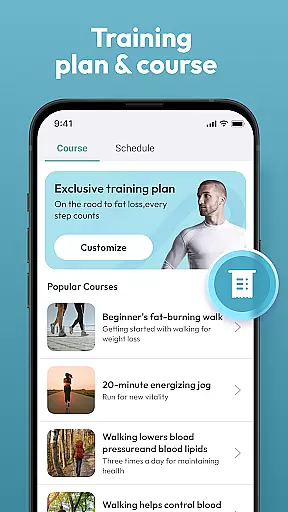
One of the key highlights is the inclusion of training courses and personalized plans tailored to individual fitness levels and goals. These features enable users to create structured workout regimens that evolve with their progress, ensuring continuous improvement and motivation.
Furthermore, the app's compatibility with most Android devices and its ability to function without additional wearable technology make it a versatile choice for anyone seeking an easy-to-use yet powerful pedometer solution. Its intuitive design ensures that users of all ages can navigate and utilize its full range of features effortlessly.
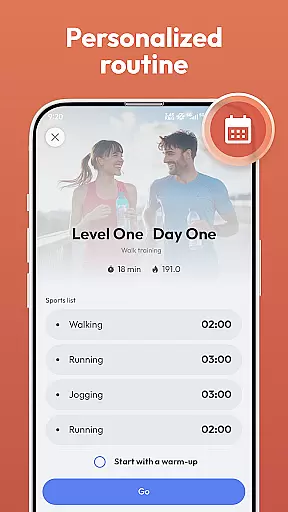
Personalized planning in a fitness app refers to the ability to create tailored workout and health plans based on individual user data. This feature is crucial as it adapts the fitness experience to match personal goals, capabilities, and progress.
Step Counter - Pedometer App offers personalized planning by analyzing daily steps, distance covered, and other health metrics. The app supports various training courses and plans that users can choose from based on their fitness objectives. Whether aiming for weight loss or maintaining an active lifestyle, the app adjusts recommendations accordingly.
Users benefit from this feature by receiving customized advice that enhances motivation and adherence to fitness routines. With tailored training programs, individuals can achieve their daily goals, such as reaching 10,000 steps, more effectively.
The true value of personalized planning lies in its adaptability. As users progress, the app continuously updates its recommendations, ensuring sustained engagement and optimal health outcomes.
Progress visualization involves presenting user achievements and health data in an easily digestible graphical format. This feature is essential as it allows users to track improvements over time and maintain motivation through visible results.
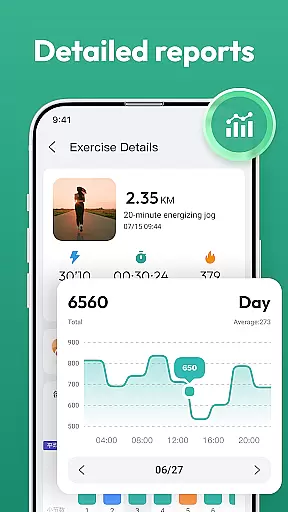
Step Counter - Pedometer App excels in progress visualization by offering daily, weekly, and monthly charts. These visual tools display step counts, distance traveled, and other relevant health metrics. Users can effortlessly monitor trends and adjust their activities to meet fitness targets.
By providing clear visual feedback, the app empowers users to understand their progress better. Visual aids like charts make it simpler to identify patterns, set realistic goals, and celebrate milestones, enhancing overall user engagement.
Ultimately, effective progress visualization fosters a sense of accomplishment and encourages continued use of the app. Users can visually appreciate their journey towards better health, reinforcing positive behaviors and long-term commitment.
Accurate step tracking
User-friendly interface
No wearables required
Detailed activity charts
Personalized training plans
Limited iOS support
Occasional syncing issues
Basic UI design
Ads in free version
Battery consumption

“Overcoming pain based on EMDR” helps you to alleviate chronic pain and stress.
 4.10
4.10
Build Healthy Habits!
4.60
Meditation app, head space app provides calm music to help you meditate & sleep
5.00
See what's really going on inside your head! Real time EEG graphs from your Muse
4.40
Binaural Beats - Fully Customizable Waves - Pure Sound - No Loops
4.50
Show your support for the development of FitNotes - Gym Workout Log
4.90
Protect your healthy sleep
4.80
You deserve easy access to important insurance information. Download for FREE.
4.70
Understand your body’s most meaningful messages and transform your health.
3.90
Beauty Care, Makeup & Skin Care Scanner | Pregnancy App For A Mom | Healthy Baby
5.00
Medbridge GO gets you moving - get back to doing what you love, faster!
4.90
Measure your Pupil Distance for Eyeglasses and VR headsets in 3 quick steps.
4.70
The Crunch Mobile app - Find a gym, manage favorites, reserve & cancel classes.
4.60
For Absolute Novices to Strength Training. Simple. Effective.
4.40
50 HD sounds to help you relax during the day and sleep great at night!
4.40
Grow with self-tests and personal routine.
4.30
Your portable blood pressure tracker. Record, monitor, and analyze BP anytime.
4.30
Pack of 66 calming lullabies for smooth fall asleep and relaxation
4.10
Sync your activities of the most popular sports tracking services
2.70


User Reviews