
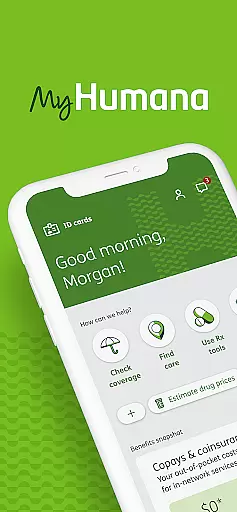

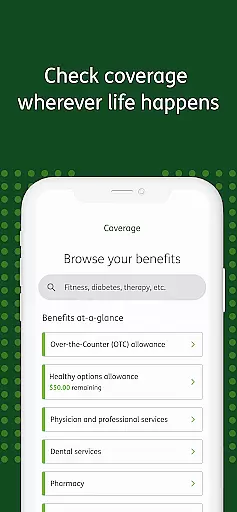
MyHumana is a comprehensive health and fitness application designed to provide users with quick and easy access to their Humana insurance information. The app allows you to view important details about your plan, including deductibles and balances, as well as information for dependents and other members covered under your plan.
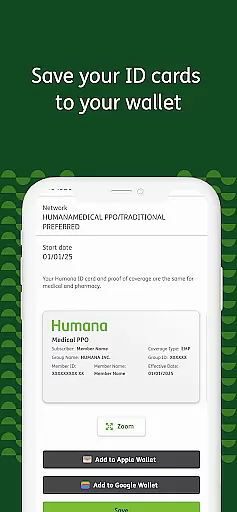
In addition to coverage details, MyHumana offers features such as viewing, saving, and faxing your Medical, Dental, and Pharmacy ID Cards. You can also get drug pricing at local pharmacies, check the status of your claims, find healthcare providers, and manage premium payments. With its user-friendly interface, this app ensures that you have all the necessary tools to manage your health benefits effectively.
One of the standout features of MyHumana is its ability to provide detailed coverage information. Users can easily access their plan details, including deductibles and balances, ensuring they are always informed about their insurance status. The app also supports managing ID cards for various services like Medical, Dental, and Pharmacy, allowing users to view, save, and fax these documents directly from their mobile devices.
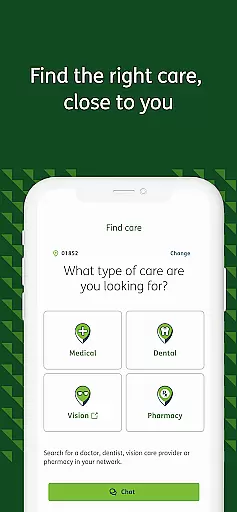
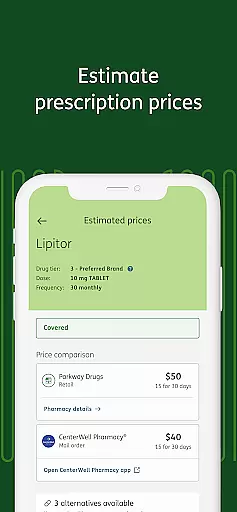
Another significant feature is the Drug Pricing tool, which helps users find cost-saving opportunities by comparing prescription prices at local pharmacies. Additionally, the Provider Finder function enables users to locate doctors, pharmacies, dentists, hospitals, and urgent care centers based on name, specialty, ZIP code, or current location. These robust features make MyHumana an essential tool for anyone looking to manage their healthcare efficiently.
Personalized planning in MyHumana is a key feature that allows users to tailor their healthcare management according to their specific needs. This involves creating customized health plans based on individual health data and preferences.
The app provides personalized insights by analyzing your health information, such as prescription pricing and coverage details. This ensures that you have a plan that not only fits your budget but also meets your healthcare requirements.
Users benefit from this feature by receiving tailored recommendations for cost-saving opportunities, like finding the best prices for prescriptions at local pharmacies. This empowers individuals to make informed decisions about their healthcare spending.
Ultimately, personalized planning enhances user engagement with the app by delivering relevant and actionable health management strategies, ensuring optimal use of their insurance benefits.
Progress visualization in MyHumana offers users a clear and intuitive way to track their healthcare activities and achievements over time. This feature transforms complex data into easy-to-understand visual formats.
Through graphs and charts, users can visualize their deductible balances, view claims history, and monitor payments. This makes it simpler to understand financial aspects related to their health coverage without getting overwhelmed by numbers.
The advantage of progress visualization is that it keeps users motivated and informed by highlighting milestones such as completed payments or resolved claims. It helps maintain an ongoing awareness of one's healthcare journey.
This functionality not only simplifies financial tracking but also encourages proactive management of health benefits, leading to better overall utilization of the insurance plan.
User-friendly interface
Comprehensive coverage details
Easy ID card management
Cost-saving drug pricing
Convenient provider finder
Limited to Humana members
Requires location sharing
Background GPS usage
Potential battery drain
Some fields not editable

a fun app full of surprises :)
 4.70
4.70
Enjoy the Gluten Free living with the best app. SCAN the barcodes & SEARCH.
3.60
Period Tracker, the easiest way to track your periods!
4.50
Optimization for TRT & Enhanced Athletes
4.5
Beauty Care, Makeup & Skin Care Scanner | Pregnancy App For A Mom | Healthy Baby
5.00
Using Recognise™ has been shown to reduce pain, and improve performance.
4.0
Get lasting results with Chair Yoga, Wall Pilates, and Walking workouts!
4.60
beat yesterday.
4.00
Point, scan, and unlock truth in every bite.
4.50
sobriety counter app to help and motivate people to stop drinking alcohol.
4.90
Easy to use step counter, calorie counter helps lose weight, count steps offline
4.80
A brain game that moves you
4.70
Measure your Pupil Distance for Eyeglasses and VR headsets in 3 quick steps.
4.70
Raccoon AI Calorie Counter. Intermittent Fasting & Timer. Macro, Carb, Protein
4.50
Walk, track, and burn calories with step counter & GPS walking tracker
4.20
Your Health Assistant
3.90
Find Paid Clinical Trials In Your Area
3.70
Use your watch as a bike computer, heart rate monitor and cycling power meter
2.50
A simple way to calculate peptide doses and also to convert different units.
4.4


User Reviews