



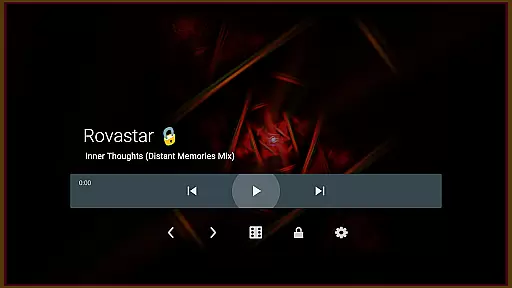

projectM Music Visualizer TV is a cutting-edge music visualization app designed specifically for Android TV. It offers the smoothest graphics and the most extensive collection of visual presets, making it highly responsive to any audio played on your device. Whether you're streaming music from popular platforms like Spotify or Pandora, projectM transforms your listening experience into an immersive visual journey.
The app allows seamless control over your music player without needing to switch apps, offering convenience and uninterrupted enjoyment. As a modernized version of MilkDrop, projectM supports .milk presets while incorporating advanced technologies for superior performance. With features like 60 FPS rendering and customizable graphic settings, this app caters to both casual listeners and audiophiles seeking high-quality visuals.
projectM stands out with its impressive array of features tailored for an optimal music visualization experience. The app boasts over 200 unique visual effects, ensuring dynamic and captivating imagery that syncs perfectly with your music. Its 60 FPS Pixel Shaded Rendering delivers ultra-smooth animations, providing a visually stunning experience on modern displays.
One of the key highlights is its ability to integrate with various music players such as Google Music, Spotify, Pandora, and PowerAMP. This integration enables users to control playback directly within projectM, streamlining the user experience. Additionally, users can fine-tune their visual quality through adjustable texture size and mesh settings, allowing for personalized optimization based on individual preferences and hardware capabilities.
projectM Music Visualizer TV offers an extensive library of over 200 visual effects, ensuring a rich and diverse audio-visual experience. This vast collection provides users with a wide array of visually stunning presets that cater to every musical genre and personal preference.
The application is not only about quantity but also quality and legality. Each preset within projectM is crafted with attention to detail, guaranteeing high-quality visuals that are copyright-authentic. Users can enjoy these visualizations with peace of mind, knowing they are experiencing content that respects intellectual property rights.
Compatibility with MilkDrop (.milk) presets further expands the creative possibilities for users. This feature allows for a seamless integration of additional visual content created by the community, enhancing the diversity and richness of the music visualization experience.
One of the standout features of projectM Music Visualizer TV is its ability to render visuals at 60 FPS using pixel-shaded technology. This ensures that the graphics are not only smooth but also highly responsive to the nuances of the music being played, providing an immersive audio-visual experience.
Users have the flexibility to adjust settings such as texture size and mesh size to optimize their visual experience based on their device's performance capabilities. These configurable graphics quality options allow for a tailored experience, balancing between breathtaking visuals and system performance.
In addition to supporting various music players like Stock Player, Google Music, Spotify, Pandora, and PowerAMP, projectM enhances the overall audio experience by offering control over music playback directly from the app interface. This includes play/pause functionality and track skipping, making it a comprehensive tool for enjoying both music and visuals without interruption.
Smoothest graphics available
Extensive preset library
Seamless music control
Highly customizable settings
Compatible with multiple players
Requires powerful hardware
Complex for beginners
Limited mobile support
No offline tutorials
Premium pricing model

Simply convert wav to mp3. Clear. Reliable. Safe.
 4.5
4.5
Tune in to the greatest hits on UK Radio | The home of Capital, Smooth & Heart.
4.90
Background pads for your band
3.80
Next generation modular control surface
4.10
Voice recorder - Audio recorder. Best recorder for recording
4.90
Slow music down without changing pitch.
3.70
Versatile MP3 recorder with auto-backup to Dropbox and Google Drive
4.10
Sing, record, and create music together — enhanced by smart voice tools.
4.00
Customize Your Favorite Songs and Videos with booster.
4.70
Full-featured, High-Quality Groovebox Workstation, perfect for Live Performance!
4.80
Most Advanced AI Song Generator and Music Creator. Rap, Pop, Rock, Gospel & more
4.70
Taal player that lets you sing any Indian & Western song with Tabla & Tanpura
4.60
Bass Booster & Volume Equalizer Pro improves your music and video sound quality
4.60
A synth that really lets you shape your sounds!
4.50
DJ Music Mixer Pro is a real DJ controllers and DJ Music Studio to remix DJ.
4.40
Ringtone Maker is free app create ringtone from music files or your recording.
4.40
PowerAudio is a powerful offline music player.
4.20
Offline Tunes, Unlimited Vibes
3.90
Powerful beat maker & DJ mixer to remix tracks, make music, & perform DJ mix
3.70


User Reviews