
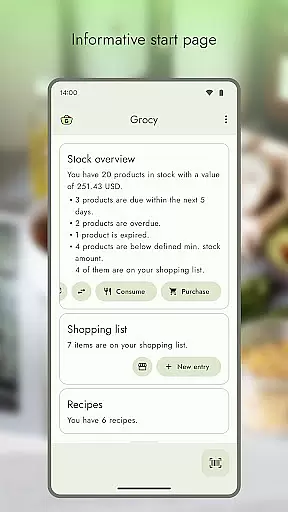
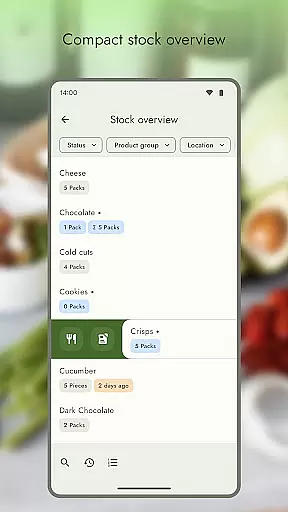
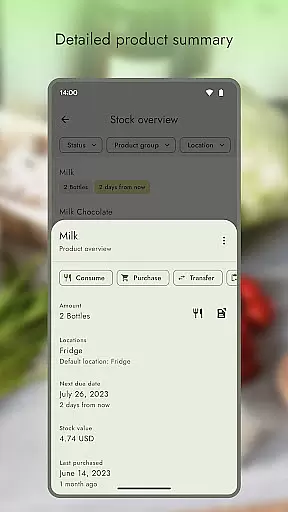
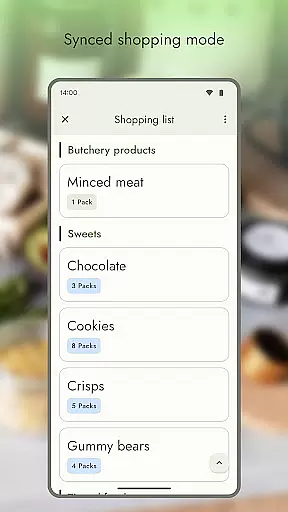
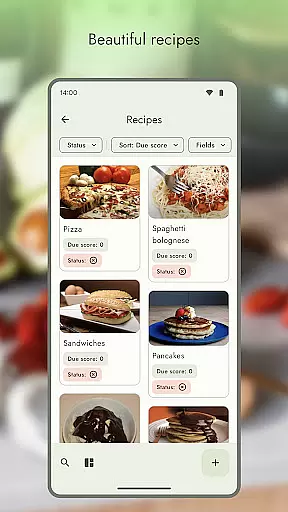
Grocy Unlock Key is an essential companion app for Grocy Android, a self-hosted grocery and household management solution. This unlock key enables advanced features within the main Grocy app, enhancing its functionality to help users efficiently manage their home inventory.
The app primarily serves to activate machine learning-based barcode scanning through Google's ML Kit. This feature allows for faster, more accurate barcode recognition compared to traditional scanning methods. Users can enjoy benefits like orientation-independent scanning and better performance with low-quality barcodes.
This unlock key represents the developer's effort to maintain a sustainable development model while keeping the main application ad-free. It provides users with the choice of supporting the project through purchase or obtaining the feature via free open-source channels.
The key feature of Grocy Unlock Key is the activation of ML Kit barcode scanning in the main Grocy Android application. This implementation utilizes machine learning algorithms to significantly improve scanning speed and accuracy.
The unlock key maintains compatibility with Grocy's existing infrastructure while adding premium capabilities. It integrates seamlessly with the main application's interface, providing users with enhanced functionality without altering their familiar workflow.
Additional technical features include support for various barcode formats and improved processing of low-quality codes. The implementation demonstrates the developer's commitment to leveraging modern technologies while maintaining open-source principles.
When managing a household, the authenticity of property listings within an app is crucial. Grocy: Unlock Key ensures that all listed items and features are accurate and verified. This app works as an extension to Grocy: Self-hosted Grocery Management, which meticulously tracks household inventory and chores.
Grocy Android leverages official APIs to provide precise data representation. The unlock key facilitates advanced functionalities like ML Kit barcode scanning, ensuring that every product entry is genuine and reliable. This verification process helps maintain the integrity of your household management system.
Users benefit from this accuracy by having trustworthy information at their fingertips. Whether it's tracking groceries or managing household tasks, the authenticity provided by Grocy ensures that users make informed decisions based on real data. This leads to more efficient household management and peace of mind.
Effective home management features are essential for maintaining an organized household. Grocy: Unlock Key enhances these capabilities by unlocking advanced tools such as ML Kit barcode scanning. These features allow users to efficiently manage their groceries and household tasks with precision.
The app integrates seamlessly with Grocy: Self-hosted Grocery Management, offering powerful batch processing and intuitive barcode scanning. With the unlock key, users gain access to superior technologies like machine learning, enabling super-fast and almost error-free scanning. This significantly boosts productivity and simplifies daily household operations.
By using Grocy's advanced home management features, users can enjoy an ad-free experience while benefiting from cutting-edge tools. The motivation behind this development is to provide a robust solution that meets all household management needs, ensuring users have a seamless and efficient experience.
Enhances core functionality
Supports sustainable development
Maintains open-source values
Improves user experience
Enables cutting-edge features
Separate installation required
Basic features locked
Additional cost involved
Limited to Android platform
Dependent on main app

Map-based search app for apartments and homes for rent.
 4.60
4.60
Find paints using a Color Muse & ColorSnap® Match
3.60
Convert your Phone to HiSense Smart TV Remote Control
4.70
Smart AI plant care schedules, Real plant experts, support & Thriving community!
4.20
Fire & Power Safety
4.50
Apartment finder for apartments for rent. Compare prices, amenities & rentals.
4.50
Turn old phones into security cameras, baby monitors, pet cams, and more.
4.70
Universal Tv Remote Control for all Tv. Cast for chromecast & all Tv Controller
4.20
Find homes for sale and apartments for rent in the best neighborhood.
4.70
Connect with reliable pros for maintenance services, plumbing, and home design!
4.80
A Smarter Home in Seconds
4.70
Plants, Beauty, Collectibles
4.60
Security App with HD Video, 2-way Audio, and event detection for Home monitoring
4.40
The official app for Home Assistant. Control your home anywhere in the world.
4.30
Turn your phone into a wifi cam with smart features and umlimited reach.
4.20
Schlage Lock Company LLC
4.00
This Fire TV Remote control's your Fire TV Device and Insignia Fire TV Remote
3.70
Control Fire TV & mirror your phone screen instantly over Wi-Fi.
3.30
An awesome mobile app for Home Security Surveillance - uses ZoneMinder
3.20


User Reviews