
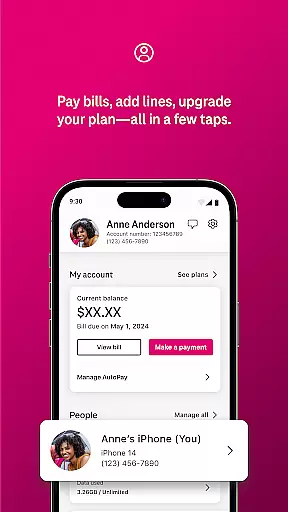
T-Life is a comprehensive lifestyle app designed to enhance the digital and physical lives of T-Mobile users. This versatile application serves as an all-in-one platform for managing your T-Mobile account, shopping for new devices, accessing exclusive benefits, and exploring rate plans. With its user-friendly interface, T-Life allows you to pay bills, track usage, configure home internet gateways, and manage financial accounts like T-Mobile MONEY® and T-Life VISA® with just a few taps.
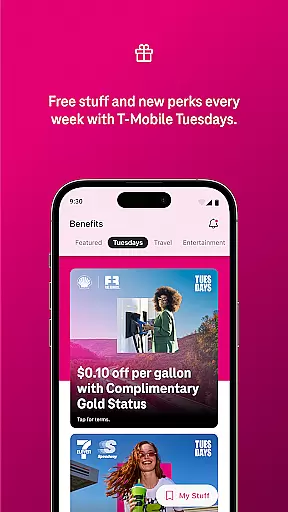
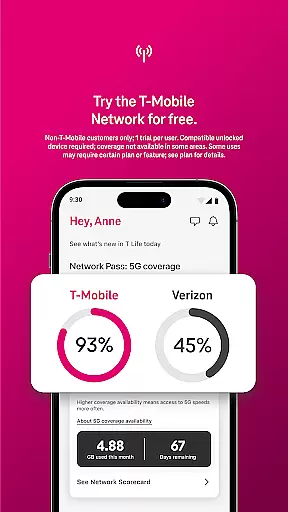
One of the standout features of T-Life is its ability to provide users with exclusive benefits such as Netflix On Us, savings on travel and dining, and participation in T-Mobile Tuesday where users can snag freebies and epic prizes. Additionally, non-T-Mobile customers can take advantage of a limited-time trial offering access to America’s Best Network and some favorite benefits for 30 days for free. The app also helps protect users from spam and robocalls through Scam Shield, ensuring a secure and seamless communication experience.
Whether you're at home or on-the-go, T-Life keeps you connected by integrating SyncUP devices for home, car, and family use. This makes it easier than ever to stay in touch with loved ones and manage smart devices remotely. By consolidating essential services into one convenient location, T-Life empowers users to make the most out of their T-Mobile subscription while enjoying added convenience, security, and savings.
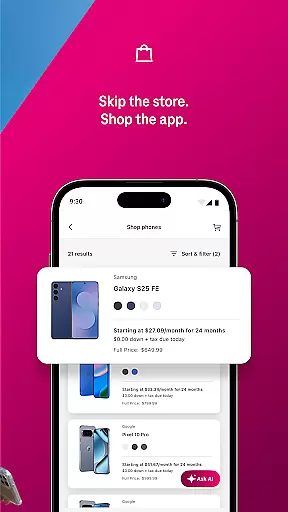
T-Life offers a rich array of features that cater to various aspects of a user's digital life. One key feature is the ability to shop for new devices from the widest selection without leaving your couch. This streamlined shopping experience ensures that users have access to the latest technology conveniently. Additionally, the app provides tools for managing your account efficiently, including bill payment, usage tracking, and device management, all within a few taps.
The app stands out with its exclusive benefits such as Netflix On Us, travel and dining savings, and the popular T-Mobile Tuesday program. These perks not only enhance user engagement but also provide tangible value through freebies and chances to win epic prizes. Furthermore, T-Life includes a limited-time trial offer for non-T-Mobile customers, allowing them to experience America’s Best Network and favorite benefits for 30 days for free, subject to change and requiring a compatible device.
T-Life also emphasizes security and connectivity. Users can protect themselves from spam and robocalls using Scam Shield, ensuring safer communication. The integration of SyncUP devices allows for seamless management of home, car, and family connections. Moreover, the app provides easy access to financial accounts like T-Mobile MONEY® and T-Life VISA®, making it a central hub for both telecommunications and financial management needs.
T-Life offers an extensive range of services and features that cater to various aspects of everyday life, ensuring users have access to everything they need in one place. The app provides functionalities for shopping, account management, exclusive benefits, and even network trials.
With T-Life, users can shop for devices from the comfort of their homes, manage their accounts, pay bills, and configure home internet gateways effortlessly. Additionally, it offers unique benefits such as Netflix On Us, savings on travel and dining, and participation in T-Mobile Tuesday events where users can get freebies and win epic prizes.
The app also allows users to switch to T-Mobile easily by providing information on rate plans and devices. It ensures users stay connected with SyncUP devices for home, car, and family, while also offering protection against spam and robocalls through Scam Shield.
Authenticity and credibility are at the core of T-Life's offerings, ensuring users receive genuine and reliable content. The app partners with well-known brands and services to provide verified benefits like Netflix On Us and savings on travel and dining.
T-Mobileu2019s collaboration with experts and industry leaders guarantees that all provided information and services are accurate and trustworthy. For instance, the Americau2019s Best Network trial is based on analysis by Ooklau00ae of Speedtest Intelligenceu00ae data, giving users confidence in the quality of service they will receive.
Furthermore, T-Life integrates financial services such as T-Mobile MONEYu00ae and T-Life VISAu00ae accounts, reinforcing its commitment to providing credible and essential lifestyle solutions. This integration assures users that their financial transactions and personal data are handled securely and professionally.
User-friendly interface
Exclusive benefits
Comprehensive account management
Secure communication tools
Convenient device shopping
Limited to T-Mobile users
Trial restrictions apply
Device compatibility required
Some features are region-specific
Dependent on network availability

Digital watch face design. Modern looking, hi-res & battery friendly.
 4.00
4.00
Unique Dark Analog style for Wear OS watches.
4.4
BILT interactive 3D instructions help you get the job done right
3.50
Immerse yourself in the serenity of lavender fields and white butterflies
4.4
Discover the "To Be a Christian" App: Your Guide to Deepening Faith!
5.00
This is a simple and highly functional alarm clock "Smart Alarm" paid version.
4.20
The go to app for taking unlimited notes!
4.50
Good magnifier app to see tiny things bigger and more clearly!
4.80
Control your Tapo smart devices from anywhere.
4.60
Pay your rent, submit work orders and much more with the RentCafe Resident App.
4.70
Kasa Smart is your portal to your TP-LINK Smart Home.
4.70
Stay connected with your loved ones & vehicles | Share live GPS location updates
4.60
The Work of Byron Katie— the mobile app for inner peace.
4.40
Fly your Solo like a boss.
4.10
Big bold digital watch face with 30 colors, 6 complications and AOD.
4.0
Designed to delight, impress and energize your festive spirit every single day
4.4
Bring the warm colors of fall directly to your wrist with Autumn Leaves!
4.0
Wear your favorite memories, loved ones, pets or travel photos on your watch
4.1
Futuristic watchface inspired by Back to the Future: sleek, retro, timeless
4.1


User Reviews