
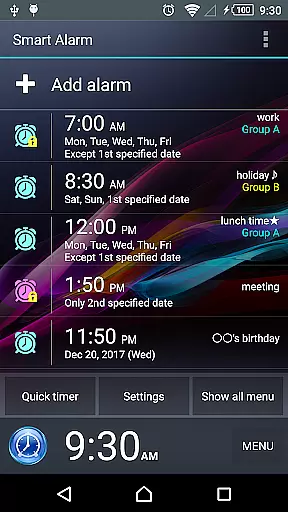
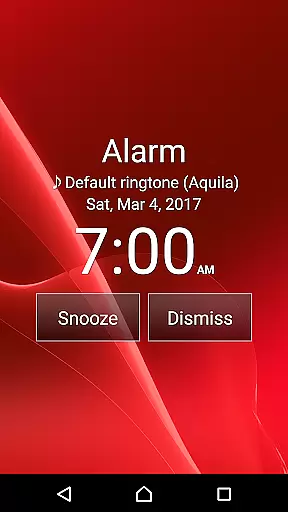
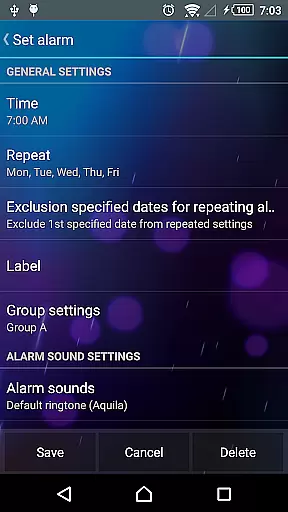
Smart Alarm is a premium alarm clock application designed for users seeking advanced functionality with simplicity. This app offers a highly customizable and user-friendly interface, allowing users to tailor their alarm experience according to personal preferences. Key features include a snooze function that reactivates the alarm at a set time, weekly repeat options, and transparency settings that blend the app's interface with the device's wallpaper.
In addition to its core alarm functions, Smart Alarm provides unique capabilities such as holiday exclusion from repeat alarms, SD card music integration, and gradual alarm sound increase with dual-stage vibration settings. The app also includes adjustable button sizes and math problem-solving to stop alarms, ensuring users wake up effectively. With compatibility across various devices, this app proves valuable for anyone needing a reliable and versatile alarm system.
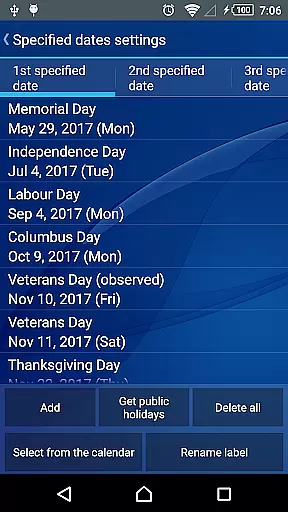
Smart Alarm stands out with its array of sophisticated features tailored to enhance the user's waking experience. One notable feature is the ability to exclude public holidays from weekly repeat settings, ensuring uninterrupted rest during long weekends. Users can also select music stored on their SD card as the alarm tone, providing a personalized wake-up call.
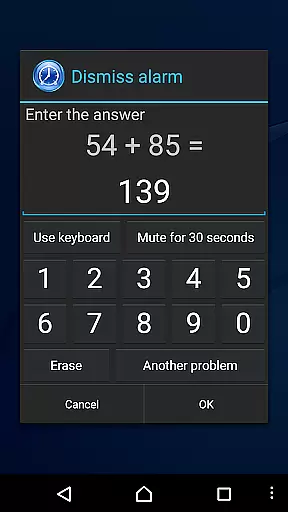
The app incorporates a gradual alarm sound increase paired with customizable two-stage vibration, preventing sudden loud noises. Additionally, Smart Alarm offers adjustable button sizes for stopping or snoozing alarms, reducing the risk of accidental touches. For those who tend to oversleep, solving a math problem or entering numbers to deactivate the alarm ensures alertness. These features collectively contribute to a smoother, more personalized morning routine.
Smart Alarm offers comprehensive lifestyle functionality that goes beyond basic alarm features. With specialized options like holiday exclusions, customizable alarm sounds from SD cards, and gradual wake-up modes, the app caters to a wide range of user needs.
The application provides unique customization features such as adjustable button sizes, math problem-solving to stop alarms, and key function personalization for stopping alarms or adjusting volumes. These aspects ensure users can tailor their alarm experience to fit their lifestyle perfectly.
In addition to standard alarm functionalities, Smart Alarm includes practical settings for silent mode, headphone usage, and vibration strength. This extensive feature set ensures the app is suitable for various daily scenarios, enhancing its value as a versatile lifestyle tool.
Smart Alarm ensures content authenticity by offering reliable and tested features that work seamlessly with device functionalities. The app's compatibility with device settings like wallpapers and SD card music enhances its credibility as a dependable alarm solution.
With disclaimers and clear notes on potential limitations, Smart Alarm maintains transparency about its operations. Users are informed about specific conditions, such as the need for device power at alarm time and considerations for task killer apps, which underscores the app's commitment to honest communication.
Permissions used by the app, such as preventing the device from sleeping and controlling vibrations, are directly related to core alarm functions. This thoughtful approach to system permissions reinforces the app's authenticity and builds trust with users seeking a reliable alarm solution.
User-friendly interface
Highly customizable settings
Gradual alarm sound increase
Dual-stage vibration settings
Math-based alarm deactivation
Paid version only
Requires device power-on
May not work with task killers
SD card dependency for custom tones
No guaranteed functionality on all devices

Turn your watch into a key fob for your Tesla
 2.90
2.90
BILT interactive 3D instructions help you get the job done right
3.50
Paranormal EVP, Ghost Box, Spirit box, ITC, Haunted, Spirit communication device
3.70
Tap to the beat with interactive videos — warm up your reflexes & have fun
4.70
Made To Order Faves
4.70
Make money, get paid cash rewards & gift cards for every survey. Earn today!
4.60
Colorful selection floral watch face with gyro for Wear OS
4.60
Colorful minimal digital watch face for Wear OS
4.60
Going above and beyond known spirit communication
3.60
Good magnifier app to see tiny things bigger and more clearly!
4.80
Daily lessons from A Course in Miracles with scheduled reminders
4.80
Get the news, events and savings that matter to you with AARP Now.
4.80
Smart & Healthy Living
4.60
The go to app for taking unlimited notes!
4.50
Paranormal Spirit Bell Trigger Device
4.30
LineLearner, the quick way to learn lines.
2.90
Healthy eating timer app to track meal pace, improve habits, and eat slowly.
4.3
Duo Watch Face (animated)
4.2
Big bold hybrid watch face with 30 colors, 5 fonts & 5 complications.
4.4


User Reviews