


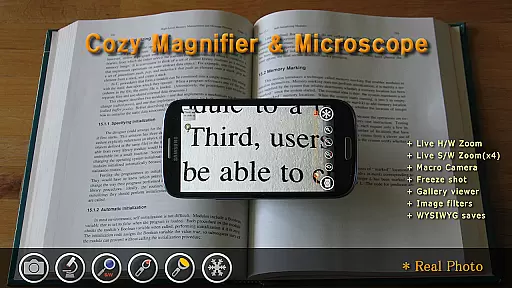
Magnifier & Microscope+ [Cozy] is a versatile digital magnification tool designed to assist users in viewing small details with ease. The app transforms your smartphone into a powerful magnifying glass, eliminating the need to carry physical magnifiers. With specialized features like microscope mode, LED flashlight, and macro camera functionality, it caters to various use cases from reading fine print to examining tiny objects.
The app offers advanced controls for brightness and zoom, multiple color filters for better visibility, and a screen freezing function for stable viewing. Its enhanced gallery allows users to manage captured images efficiently. Particularly useful in low-light conditions, the built-in LED flashlight ensures optimal visibility. Whether you're a professional requiring detailed inspections or someone needing assistance with small print, this app provides a comprehensive solution.
This lifestyle application boasts an array of practical features that enhance user experience. The primary magnifier function includes an intuitive zoom controller with continuous auto-focusing capabilities. Users can employ pinch and vertical drag gestures to adjust zoom levels and utilize the temporary zoom-out feature for precise targeting.
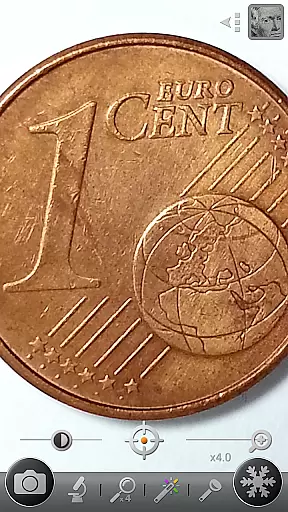
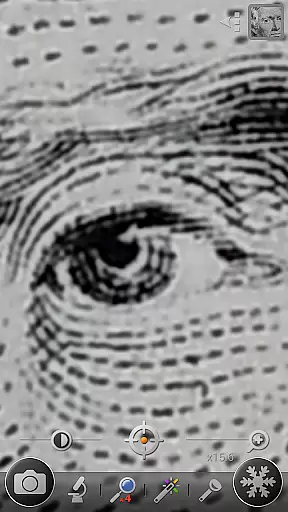
Unique to this app is its microscope mode that offers up to 4x magnification, making it suitable for detailed inspections. The inclusion of various color filters such as negative, sepia, and mono enhances text readability and image clarity. Additionally, the macro camera feature enables users to capture high-quality close-up photographs, while the screen freezing function allows for stable viewing of magnified content.
Practicality extends to low-light environments with the integrated LED flashlight, operable via dedicated button or volume keys. The app's enhanced gallery system facilitates easy management of saved images, all stored conveniently in the DCIM/CozyMag directory. These comprehensive features make Magnifier & Microscope+ [Cozy] an indispensable tool for anyone needing reliable magnification solutions.
Magnifier & Microscope+ [Cozy] offers a comprehensive suite of features that cater to various lifestyle needs, making it more than just a magnification tool. With functionalities ranging from a digital magnifier and microscope mode to an LED flashlight and macro camera, the app ensures users are equipped for multiple scenarios requiring close-up visibility or detailed imaging.
The app's versatility is further enhanced by its color filters, which include Negative, Sepia, Mono, and Text Highlight options. These filters not only aid in improving readability and visual clarity but also add a creative touch to image capturing. Whether you're examining small prints, identifying tiny model numbers on semiconductors, or exploring macro photography, this application provides the necessary tools tailored to diverse user requirements.
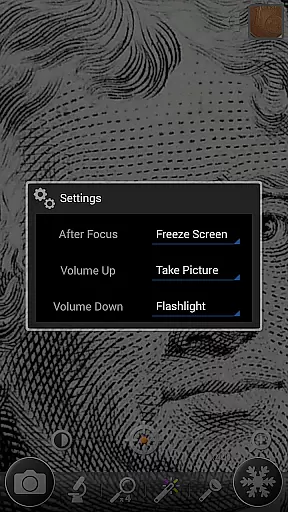
Additionally, Magnifier & Microscope+ [Cozy] addresses convenience with practical features such as screen freezing for stable viewing, brightness control, and zoom adjustments. The embedded gallery enhances user experience by allowing easy access and management of captured images. By covering these extensive lifestyle categories, the app positions itself as an indispensable utility for anyone needing reliable magnification solutions in their daily life.
When evaluating the content authenticity and expert credibility of Magnifier & Microscope+ [Cozy], it's evident that the app delivers genuine value through its specialized functionalities. Developed with precision, the app transforms your smartphone into a powerful digital magnifier, ensuring that users can rely on its performance for tasks requiring enhanced visibility. Its recommendation by reputable sources like Google Korea for Mother's Day amplifies its credibility, suggesting recognition within tech communities.
The app's advanced features, including microscope modes (x2, x4), an LED flashlight, and macro camera capabilities, reflect a deep understanding of user needs. Each feature is meticulously crafted to provide practical solutionsu2014whether itu2019s reading small prints, examining intricate details, or capturing macro images. Continuous auto-focusing and temporary zoom-out functions demonstrate attention to detail, offering seamless usability that one would expect from expertly designed applications.
Moreover, while Magnifier & Microscope+ [Cozy] acknowledges limitations based on device capabilities, it maintains transparency about potential constraints without compromising functionality. This honesty reinforces trustworthiness, assuring users that they are engaging with a credible tool developed with their best interests in mind. Overall, the combination of innovative features and transparent communication establishes Magnifier & Microscope+ [Cozy] as a reliable choice endorsed implicitly by both experts and satisfied users alike.
User-friendly interface
Multiple magnification modes
Integrated LED flashlight
Advanced color filters
Convenient image gallery
Ads in free version
Device compatibility issues
Limited magnification power
No real-time sharing
Basic autofocus limitations

Big bold digital watch face with 30 colors, 6 complications and AOD.
 4.3
4.3
Discover how to help puppies stay calm around noise with this helpful app.
4.4
Take Hobby Lobby with you wherever you go!
3.40
BILT interactive 3D instructions help you get the job done right
3.50
Paranormal EVP, Ghost Box, Spirit box, ITC, Haunted, Spirit communication device
3.70
Crochet made easy: step-by-step tutorials, beginner patterns & projects
4.60
My Diary - Daily Journal with lock: Diary journal app and secret diary with lock
4.80
Simple, stylish & fresh watch face. Customize colors, gradients & complications.
4.70
Your store’s deals, where you are.
4.80
Discover the "To Be a Christian" App: Your Guide to Deepening Faith!
5.00
Daily lessons from A Course in Miracles with scheduled reminders
4.80
Kasa Smart is your portal to your TP-LINK Smart Home.
4.70
Zodiac & Horoscope Launcher: Daily Sign Predictions & Astrology
4.40
This minimalist yet classic board design brings a futuristic twist to your wrist
4.20
Mixing Colors for Menswear
4.20
Connect to your Shark ROBOT™ from anywhere using the SharkClean™ App.
3.60
Big bold weather watch face with dynamic backgrounds and 3 complications
4.4
Designed to delight, impress and energize your festive spirit every single day
4.1
The cutest Autumn watchface featuring the adorable Mr. Squirrel
4.1


User Reviews