
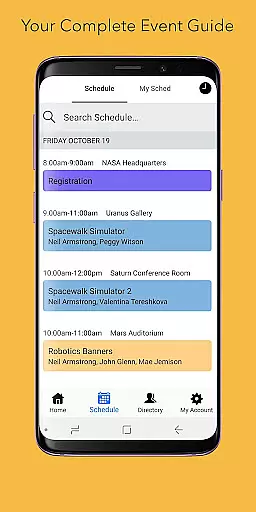
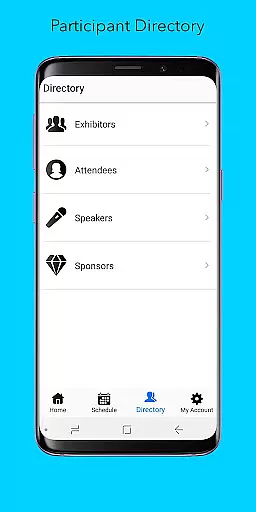
Sched is a leading platform for session registration and attendance management, designed to streamline the organization of complex multitrack events. This app consolidates all event details into one accessible location, offering users an efficient way to manage their schedules.
With features like a full schedule view, personalization options, a comprehensive directory, and offline caching, Sched ensures that users can easily access key information without needing a physical event guide. Whether you're attending a conference or managing one, Sched enhances the overall experience by providing tools that simplify participation and planning.
The app's ability to sync online schedules with mobile devices makes it invaluable for attendees who need to make on-the-go changes. Its vision of transforming events from something endured to something experienced reflects its commitment to improving how we engage with professional gatherings.
Sched offers a robust set of features tailored for managing and enhancing event experiences. One standout feature is the full schedule view, which allows users to conveniently browse entire event schedules directly within the app, eliminating the need for paper guides.
Personalization is another core aspect, enabling users to log in and view their customized schedules on the go. Attendees can create accounts to save favorite sessions instantly, ensuring they never miss important events. The directory feature provides detailed profiles of speakers and exhibitors, enriching the networking potential.
Offline caching ensures reliability, as users always have access to their schedules even without an internet connection. These features collectively empower users to maximize their event participation while minimizing logistical hassles, making Sched an essential tool for modern event management.
Task creation and detail customization are essential features for event management platforms like Sched. This functionality allows event organizers to create detailed sessions, workshops, or presentations with specific information such as time, location, speaker details, and session descriptions.
Sched offers a comprehensive suite of tools for task creation. Organizers can easily input session details, categorize events, and manage multiple tracks within a single platform. The ability to add rich descriptions, multimedia content, and interactive elements enhances the attendee experience while providing all necessary information in one place.
The benefits of this feature are numerous. Attendees can conveniently browse through the entire schedule, getting key information without needing an external event guide. They can personalize their experience by creating their own schedules, marking favorite sessions, and receiving timely reminders. This level of customization ensures that each participant can tailor the event to their specific interests and needs.
For event organizers, the value lies in streamlined management and enhanced engagement. By providing a detailed and customizable scheduling solution, Sched helps increase attendee satisfaction, improve session attendance, and gather valuable data on participant preferences. This ultimately leads to more successful and impactful events.
Reminder settings play a crucial role in ensuring attendees don't miss important sessions at events managed through Sched. This feature allows users to set up personalized notifications for different sessions, helping them stay organized and make the most of their event experience.
Sched's reminder system is designed for maximum flexibility. Users can choose from various notification options, including push notifications, email alerts, or both. They can set reminders for specific times before a session starts, ensuring they have enough time to move between venues or prepare for upcoming events. The app also supports recurring reminders for multi-day or regular events.
The practical benefits of this feature are significant. Attendees can focus on networking and learning without constantly checking the schedule, knowing they'll receive timely alerts about their chosen sessions. This reduces stress and enhances overall event satisfaction. For event organizers, effective reminder settings lead to better session attendance rates and improved participant engagement.
What sets Sched apart is the intelligent integration of reminder settings with other features. The app automatically adjusts notifications based on schedule changes, provides real-time updates, and syncs across devices. This comprehensive approach to time management ensures that participants never miss important sessions, even when making last-minute changes to their personal schedules.
User-friendly interface
Comprehensive scheduling
Offline functionality
Real-time updates
Networking opportunities
Limited free features
Occasional sync issues
Requires account creation
Interface not intuitive for all
Some features are event-specific

Mobile Event Guide for Greater NY Dental Meeting
 4.0
4.0
Buy event tickets easily with our user-friendly App. Stay updated on hot events
4.0
Rocket Monkey - Space rocket launch schedule for launch sites around the world
4.20
The official app of the Carmel Christkindlmarkt!
4.2
Find EDM shows near you! See your favorite artists live, and discover new music.
4.90
The Official App
3.70
Text message invitations for birthday party, wedding, graduation, baby shower +
4.60
Fast Scans. Happy Fans. For Every Hometown!
4.60
Discover events, experiences, and things to do near you - Anytime, Anywhere!
4.70
Invitation card maker for birthday party & Wedding. Digital greeting card editor
4.90
CUE Live utilizes ultrasonic sound waves to sync devices at CUE enabled events
4.80
Beautiful invitation cards + easy RSVP tracking for any event. Design Invites.
4.80
Design Invitations & Cards for Any Occasion
4.80
Find Live Event Ticket Deals to Sports, Concerts, Festivals, & Comedy For Less!
4.80
Invitation Card Maker, Design & share wedding, birthday & party invites fast
4.40
Track birthdays, habits & goals. Unlimited countdowns and count-ups
4.20
Manages display and transfer of tickets from the Mundo Tickets platform
3.80
ETH Mining provides secure way to mine Ethereum & earn ETH in Cloud mining app
3.50
TV Garden - World Live TV : Play & cast your videos seamlessly!
3.20


User Reviews