
Lithium Pro is an advanced upgrade package for the free Lithium app, designed specifically for book enthusiasts who demand more customization and functionality. This application unlocks a suite of professional features within the main Lithium app, enhancing your reading experience significantly.
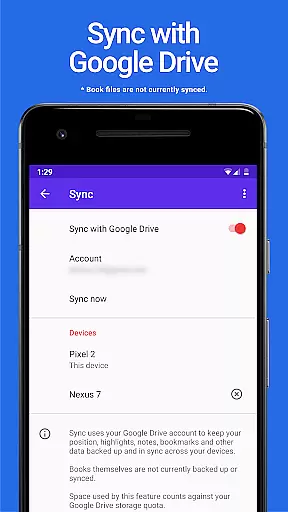
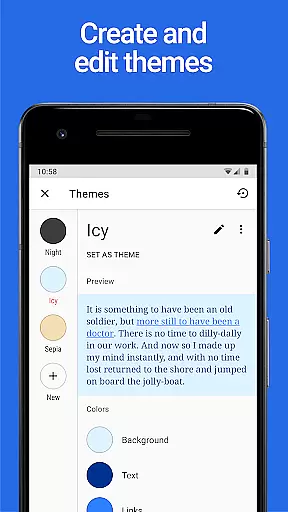
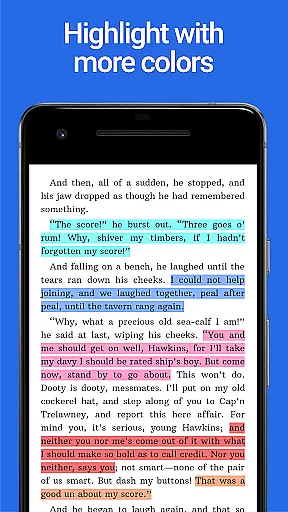
Key functionalities include automatic data synchronization across devices via Google Drive, allowing you to maintain continuity in your reading habits. Additionally, users can create personalized themes by adjusting background, text, and link colors, offering a tailored visual experience. The app also provides expanded highlight color options, giving readers more tools to annotate and organize their content effectively.
Ideal for avid readers and students, Lithium Pro transforms your basic reading app into a powerful tool for managing extensive libraries and detailed study notes. By upgrading, users ensure that their reading environment is both highly functional and visually suited to their preferences.
The Lithium Pro app offers several distinctive features that set it apart from standard reading applications. First and foremost, the synchronization feature allows seamless updates across all your devices using Google Drive. This ensures that any notes or progress are consistently updated wherever you choose to read.
Another standout feature is the custom themes capability. Users have the freedom to design their own reading environment by altering page background colors, text colors, and hyperlink hues. This level of personalization helps reduce eye strain and makes reading more enjoyable over extended periods.
Additionally, Lithium Pro includes a broader palette of highlight colors, which is particularly beneficial for those who rely on color-coding for organization or study purposes. These enhanced features collectively provide a richer, more customizable reading experience, making it an invaluable tool for dedicated readers.
When it comes to digital reading, the size and authenticity of an e-book library are crucial factors for avid readers. Lithium Pro understands this need and offers a seamless solution through its advanced Sync feature. By leveraging your Google Drive account, the app ensures that your entire e-book collection is safely backed up and consistently synchronized across all your devices.
This synchronization capability guarantees that you have access to your full library, no matter which device you're using. While the app currently doesn't support direct book backups or syncing, the existing system maintains your reading progress and settings across devices. This comprehensive approach to library management demonstrates Lithium Pro's commitment to providing users with a robust and reliable e-book experience.
The application works in tandem with the free version of Lithium, activating premium features that enhance your digital reading journey. With Lithium Pro, you can rest assured that your extensive e-book collection remains organized, accessible, and ready for your next reading session on any of your devices.
Format compatibility is a vital aspect of any modern reading application, determining how well it can handle different document types and display them accurately. Lithium Pro excels in this area by offering extensive format support while enhancing the reading experience through its premium features. Once installed alongside the free Lithium app, Lithium Pro unlocks professional-grade functionality that transforms how users interact with their digital content.
The application enables users to customize their reading environment extensively. Through custom themes, readers can personalize background colors, text hues, and link appearances. This flexibility in format presentation allows for optimal readability across various document types, ensuring that each format displays in the most comfortable and visually appealing way possible.
Additionally, Lithium Pro expands annotation capabilities with more highlight color options, making it easier to mark important passages regardless of the document format. These enhanced formatting options, combined with future planned features, demonstrate Lithium Pro's dedication to providing comprehensive format compatibility while maintaining a personalized and professional reading experience.
Enhanced sync
Custom themes
More highlight colors
Google Drive backup
Future feature updates
Separate install needed
No book backup
Higher cost
Limited without main app
Fewer unique features

"BIG A, little a. What begins with A?"
 4.10
4.10
Read the KJV Bible with Strong’s offline: reading plans, audio Bibles, and more.
4.70
Translate into 100+ languages with the world’s most accurate AI translator.
4.70
Bible Study App with Audio Book, Verse of the Day, and Devotionals.
4.80
Universal Zoom, learn about sizes & distances of the universe and microcosmos
4.80
Manage collectibles, survey and treasure maps in Elder Scrolls Online.
4.40
F9 Cookbook Mobile App
4.60
All in one Calibre libraries on your phones and tablets.
3.80
Follow complex state CCW permit laws and lawfully carry firearms in each state.
4.80
What’s that bird? Just answer 5 questions, snap a photo, or record its song!
4.90
My Bible offers a comprehensive app by providing offline access, daily verses.
4.80
Daily Devotional Widgets & Hourly Verses. Listen to Bible & Watch Holy Stories
4.70
Full text, sheet music, and recordings of the print edition
4.60
“It is fun to have fun, but you have to know how!”
4.40
Pretty Moon information App with Complications and Tile
4.30
Knots 360 Pro ( 3D ) shows you animated 192 knots in 3D perspective
4.10
WebNovel - Read Solo Leveling novel and comic
4.10
America's best dictionary and thesaurus - with premium content and no ads
3.40
Battle Royale Chapter 5 Season 2 HD Wallpapers Emotes Skins and BattlePass
3.00


User Reviews