

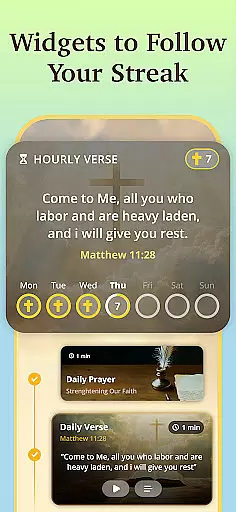




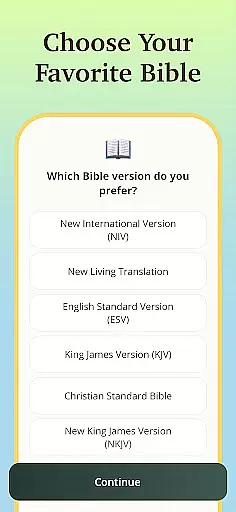
Bible Path is a comprehensive spiritual companion app designed to deepen your relationship with God through interactive Bible study tools, daily devotionals, and engaging content. The app offers a vast library of Bible versions for both offline and online reading, including popular translations like KJV, NIV, and ESV. With features such as Daily & Hourly Widgets, users can keep inspiring Bible verses constantly visible on their home screen.
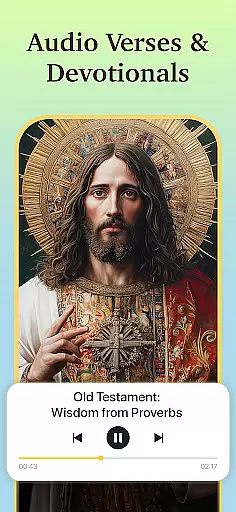
Visual learners will appreciate the Watchable Stories feature that brings Bible narratives to life through beautiful animations. The app also includes an Audio Bible for reflective listening during commutes or quiet moments. Users can engage in theological discussions via Bible Chat, explore commentaries, compare translations, and access guided faith-building exercises. Whether you are seeking answers to life's questions or looking to strengthen your devotional practice, Bible Path provides the necessary tools to illuminate your spiritual journey.
Bible Path stands out with its diverse range of features tailored to enhance your spiritual experience. One key feature is the Daily & Hourly Widgets, which allow users to customize their home screens with inspiring Bible verses that refresh every hour. This keeps the Word of God ever-present throughout the day without needing to open the app.
The app also offers Watchable Stories, providing animated narratives that make classic Bible stories accessible for families and visual learners alike. Another highlight is the Bible Chat functionality, enabling deep theological discussions and interpretations within a community of believers. Additionally, the Audio Bible lets users immerse themselves in holy scriptures through narrated verses, prayers, and guided meditations. These features collectively create an interactive environment where users can engage with scripture in multiple formats, ensuring a rich and varied devotional experience.
Bible Path offers an extensive e-book library that includes multiple versions of the Bible, catering to various linguistic and theological preferences. With English versions such as KJV, NIV, and ESV, alongside Spanish and Portuguese translations like RVR 1909 and NVI-PT, users have access to a rich repository of scriptural texts.
The app ensures copyright authenticity by providing versions that are either in the public domain or properly licensed. This means users can trust the legitimacy of the texts they are reading, whether for personal study or academic research. The inclusion of translations like the Bishop's Bible and Coverdale further demonstrates the app's commitment to offering genuine and authoritative content.
For those who wish to compare different interpretations of the scriptures, Bible Path supports this through its vast library. Users can explore commentaries and cross-reference translations, deepening their understanding of biblical teachings while being assured of the texts' credibility.
This comprehensive collection empowers readers to engage with the Bible in a manner that suits their individual needs, from daily devotionals to in-depth exegetical studies, all within a trustworthy digital environment.
One of Bible Path's strengths is its format compatibility, allowing users to engage with the scriptures in multiple ways. Whether through readable text, audio narration, or animated stories, the app provides diverse formats to accommodate different learning styles and preferences.
The Audio Bible feature enables users to listen to narrated verses, making it ideal for reflection during commutes or quiet moments. This auditory option complements the traditional reading experience, ensuring that users can remain connected to God's Word even when they're on the move.
In addition to textual and audio formats, Bible Path incorporates watchable Bible story animations. These visual narratives offer a fresh perspective on familiar stories, engaging visual learners and families in a shared devotional experience. Such multimedia integration enriches the spiritual journey.
By supporting offline and online reading across various devices, Bible Path ensures seamless access to its resources. Users can customize their experience with daily and hourly widgets, integrating scripture into their routines regardless of format preference, thus fostering a consistent and meaningful connection with the Bible.
User-friendly interface
Extensive Bible version support
Interactive study tools
Daily inspirational widgets
Engaging animated stories
Limited offline audio options
Occasional widget glitches
Advanced features require subscription
Interface can feel overwhelming
Some translations not available offline

Powerful Bible study tools linked to every verse in an easy-to-use Bible reader!
 4.60
4.60
Mirror Bible - eye-opening paraphrase translation of the NT by Francois du Toit
4.30
Essential Technical Rescue Field Operations Guide 6, the Industry Standard Guide
4.20
Master AKC Rally signs with in-depth hints, diagrams, and expert guidance.
4.50
8 Dr. Seuss short stories in 1 app!
4.70
The Original & Authentic Crystals, Gemstones, Rocks & Minerals Encyclopedia.
4.60
Read Trending Romance Stories
4.00
Premium reader for ePub, PDF, and more. TTS and translation. Great on any screen
3.50
Calculate, Knowledge, Homework
4.40
What’s that bird? Just answer 5 questions, snap a photo, or record its song!
4.90
The Bible Audio Guide
4.80
Track your Star Wars book collection across Canon & Legends
4.80
Bible Study App with Audio Book, Verse of the Day, and Devotionals.
4.80
King James Bible read offline, AI Priest, Bible Quiz, Guiding Prayers & Plans
4.80
Watch real short episodes in just minutes— addictive, you won't be able to stop!
4.70
CleverBook Pro makes the popular guide for the game even better!
4.00
Read popular romance books and web novels on the fantastic ebook reader
3.50
Sea tide predictions for all coastal U.S. locations.
4.4
Fast loot guide for ARC Raiders. Simple tips, stats, maps, and item details.
4.0


User Reviews