




Groundwire by Acrobits is a premier SIP softphone client designed for both personal and professional communication needs. This app elevates your calling experience with crystal-clear voice and HD video calls, supporting formats like Opus, G.729, H.264, and VP8. It ensures top-tier security with military-grade encryption, making it ideal for users who prioritize privacy.
Beyond basic calling, Groundwire offers advanced features such as seamless call transition between WiFi and mobile data, battery-efficient push notifications, and extensive customization options for SIP settings, UI, and ringtones. Compatible with major VoIP providers and PBX systems, this app is perfect for those seeking a reliable, high-quality communication tool that works across multiple devices and operating systems.
Whether you're managing business communications or staying connected with loved ones, Groundwire provides a comprehensive solution that combines performance, security, and ease of use. Its one-time cost and lack of hidden fees make it an excellent choice for anyone looking to leverage SIP technology for improved call quality.
Groundwire stands out with its robust feature set tailored for modern communication needs. The app delivers exceptional audio quality through support for advanced codecs like Opus and G.729, ensuring crystal-clear voice calls even in challenging network conditions. For video calls, users can enjoy up to 720p HD quality powered by H.264 and VP8 codecs, providing sharp and smooth visuals during virtual meetings or casual chats.
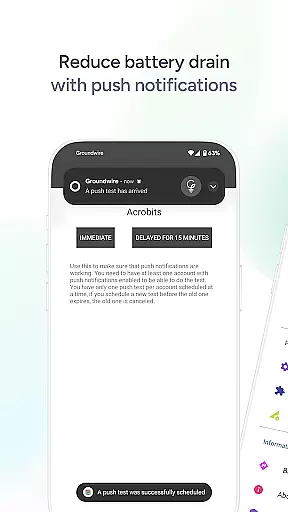
Security is a cornerstone of Groundwire's design, featuring military-grade encryption to safeguard every conversation. Additionally, the app optimizes battery usage with efficient push notifications, allowing users to stay connected without worrying about excessive drain. Its ability to seamlessly switch between WiFi and cellular data ensures uninterrupted calls, while multi-device compatibility prepares users for future advancements like 5G networks.
Customization options abound in Groundwire, from tailoring SIP settings to personalizing ringtones and UI elements. With added functionalities like instant messaging, attended and unattended transfers, group calls, and voicemail, this app goes beyond traditional softphones to offer a complete communication suite that adapts to various user requirements.
Real-time messaging speed and reliability are crucial for maintaining seamless communication in any SIP softphone application. Acrobits Groundwire ensures that messages are delivered instantly, without delays or failures, which is essential for both personal and professional use.
The app achieves this through robust infrastructure and optimized data transmission protocols. By leveraging advanced technologies, it guarantees that text-based communications are consistently fast and dependable. This reliability fosters trust among users who rely on the app for important conversations.
For users, this means they can engage in real-time chats with friends, family, or colleagues without worrying about message delivery issues. The confidence in knowing that their communications will be promptly received enhances overall user experience and satisfaction.
In summary, Acrobits Groundwire's commitment to real-time messaging speed and reliability ensures that users enjoy uninterrupted, efficient, and trustworthy communication, making it an ideal choice for those seeking a dependable SIP client.
Media sharing support is a vital feature in modern communication apps, allowing users to exchange various types of media effortlessly. Acrobits Groundwire excels in this area by providing comprehensive support for different file formats, ensuring that users can share images, videos, and documents without compatibility issues.
The app's architecture is designed to handle large files efficiently while maintaining high transfer speeds. This capability is particularly beneficial for professionals who need to send high-resolution images or lengthy video conferences recordings. The assurance that media will be shared smoothly enhances productivity and collaboration.
Users benefit from an intuitive interface that simplifies the process of selecting and sending media files. With just a few taps, they can enrich their conversations with visual content, making interactions more engaging and meaningful. This ease of use encourages frequent utilization of the media sharing feature.
Ultimately, Acrobits Groundwireu2019s robust media sharing support empowers users to communicate more effectively, whether for personal connections or business collaborations, setting it apart as a versatile and reliable SIP softphone solution.
Crystal-clear audio
HD video calls
Military-grade security
Battery efficiency
Seamless connectivity
Requires SIP service
No free version
Complex setup
Limited offline use
Premium pricing

Pure modern IRC experience for Android
 3.70
3.70
Secure Messaging App to Enhance Messenger Texting Experience and Organize SMS.
3.50
Google's fast and secure browser
4.10
Chat on the Jabber network (XMPP protocol); support for SMS and other gateways
2.10
Message and video call your family and friends in HD!
3.80
Caller ID App! Add names & photos to unknown calls & Call Recording
4.40
An agentic AI browser for Android, built by Perplexity
4.50
Federated instant messaging for your mobile device (Jabber, XMPP, Snikket)
4.10
Manage Phone Calls, call history, and contacts easily with Phone Pro.
4.5
A browser that does more than load page, like keeping your privacy safe.
4.70
Messenger for SMS - texting message app, faster, simpler & safer, for you.
4.70
Say “hello” to privacy.
4.60
A web browser that respects your privacy.
4.30
Simplify texting with Messages SMS, offline messaging, themes & smart tools!
4.30
2nd Phone Number Line for Anonymous Texting, Calling, and Picture Messages
4.30
RemoteHams.com Android RCForb Client Pre-Release
4.30
BiP is a fast, secure, free messaging and HD video calling app!
4.10
Call Forwarding is easy and simple application to use.
3.80
Radio communication simulator for gaming communities
4.1


User Reviews