
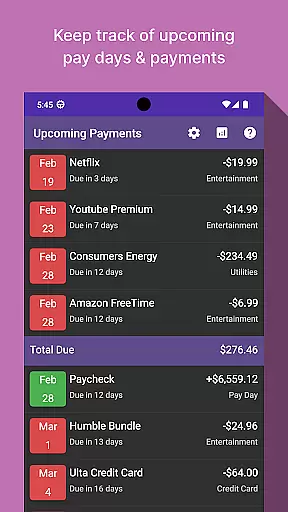
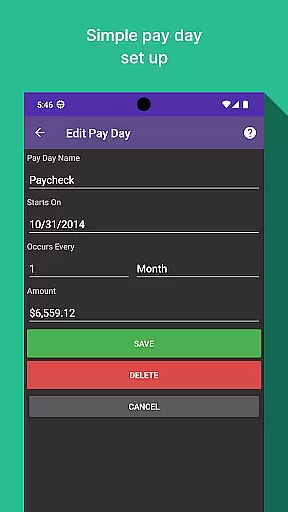
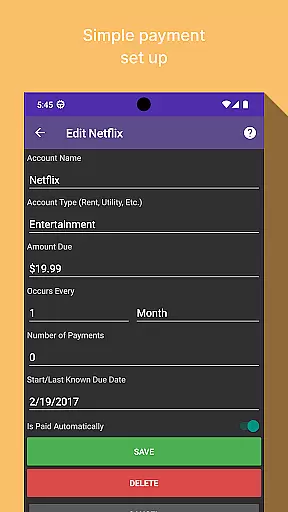
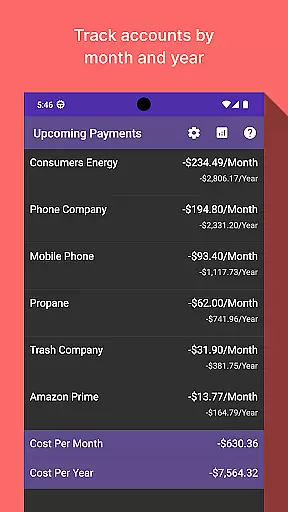
Bill Manager is a comprehensive financial management application designed to help users efficiently track and manage their upcoming bills. The app's core functionality revolves around bill tracking, ensuring users never miss a payment deadline. By providing detailed information on pending bills, payment amounts, and pay day reminders, it serves as an essential tool for personal finance organization.
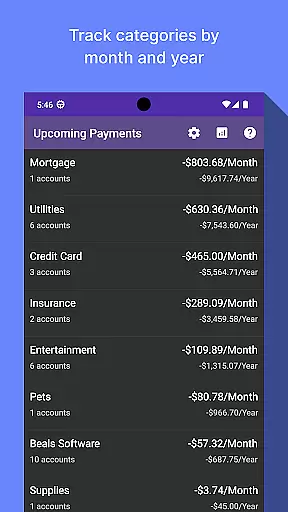
A key feature of Bill Manager is its robust analytics view. This functionality allows users to analyze their spending patterns through categorized reports by month and year. The app supports multiple accounts, giving users a complete picture of their financial obligations across different banking platforms. Whether you're managing personal expenses or monitoring shared household bills, this app provides valuable insights into your financial commitments.
The app proves particularly useful for individuals with irregular income schedules or multiple bill payments. By clearly displaying which bills are due between current date and next pay day, it helps users prioritize payments and avoid late fees. This level of financial visibility can significantly reduce stress and improve overall money management skills.
Bill Manager distinguishes itself through several innovative features that enhance the bill tracking experience. The app's primary feature is its intelligent bill reminder system, which not only lists pending payments but also calculates remaining days until each due date. This functionality extends to pay day tracking, where users can input their income schedule to receive customized payment alerts.
The analytics component offers powerful visualization tools for expense management. Users can generate detailed reports showing category-based spending trends and year-over-year comparisons. The app supports multiple account integration, allowing users to consolidate all their financial obligations in one place. Additionally, the customizable notification system ensures users receive timely reminders about upcoming payments.
What sets Bill Manager apart is its ability to provide actionable insights through data analysis. The app doesn't just list bills; it helps users understand their spending patterns and make informed financial decisions. With features like automatic categorization of expenses and historical trend analysis, users can identify areas for potential savings and better allocate their financial resources.
Account and fund security is a critical aspect of any financial application, ensuring that users' sensitive information remains protected. Bill Manager employs advanced encryption protocols to safeguard your data against unauthorized access. This means that all your bill details, payment schedules, and personal information are encrypted both in transit and at rest.
In addition to encryption, the app implements multi-factor authentication to further secure your account. By requiring more than just a password to access your account, it significantly reduces the risk of unauthorized access. This added layer of security ensures that only you can make changes to your billing information or view your financial details.
The benefits of these security measures are immense. Users can enjoy peace of mind knowing that their upcoming bills and pay day information are kept confidential. With Bill Manager, you can focus on managing your finances without worrying about potential security breaches, allowing for a safer and more reliable bill tracking experience.
A seamless transaction experience is essential for any finance app, enabling users to manage their bills efficiently and with minimal hassle. Bill Manager excels in providing an intuitive interface where users can easily track their upcoming bills, understand payment amounts, and be aware of their next pay days. The app's design emphasizes clarity and ease of use, ensuring that users can quickly grasp their financial obligations.
Moreover, the analytics view within Bill Manager offers a detailed breakdown of costs by categories and accounts on a monthly and yearly basis. This feature allows users to gain insights into their spending patterns and make informed decisions about their finances. By presenting this data in an accessible manner, the app empowers users to take control of their financial health.
Ultimately, the value of a superior transaction experience lies in its ability to simplify complex financial management tasks. With Bill Manager, users benefit from a streamlined process that not only tracks bills but also enhances understanding of personal finance through insightful analytics. This comprehensive approach ensures that managing bills becomes a less daunting and more empowering experience.
User-friendly interface
Comprehensive analytics
Multi-account support
Customizable reminders
Pay day tracking
Limited free features
No automatic bill pay
Occasional sync issues
Premium subscription cost
Steep learning curve

Manage your account, make a payment, and redeem your rewards on the go.
 4.50
4.50
Need help before payday? Get cash advances with no interest or credit checks.
4.60
Debt pay off. Build credit history. AI budget tool. Loan offers.
4.60
Your insurance, anytime, anywhere
4.00
No credit check, no interest, no worries.
4.70
“Money Manager” is an optimized application for personal asset management.
4.70
Real-time tracking: Stocks, Indices, Futures, Commodities, ETF, & Funds prices.
4.60
SuperQi, Your all-in-one Super App.
1.30
Banking with no monthly fees, fee-free overdraft, and early payday.
4.70
PayMe helps you claim money from settlements on companies that harmed you.
4.80
Check EBT, SNAP, WIC balances, manage food stamps, and save money with benefits
4.80
Keep track of your subscriptions with no limitations
4.80
Money App - Earn Cash back, Fast Cash Advance, Personal Loan Offers, Banking
4.70
Manage and cancel subscriptions, lower bills, track expenses, create budgets.
4.60
Put crypto to work & earn rewards. Stake crypto like Ethereum, Solana & Cardano
4.40
Mine Bitcoin in the cloud! Earn BTC daily with high-speed mining power.
4.30
The PayPal app is the secure way to send and receive money, shop and pay in 4.
4.20
View BSC Transactions for multiple accounts
3.90
Expenses, Bills, Budget and Accounts - All seamlessly integrated in one app!
3.80


User Reviews