
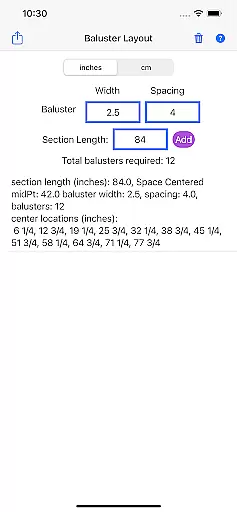
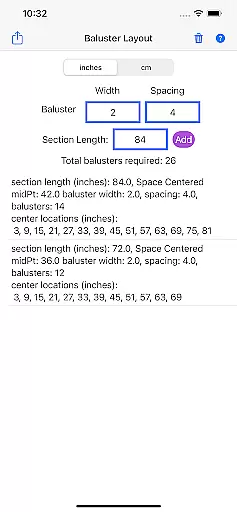
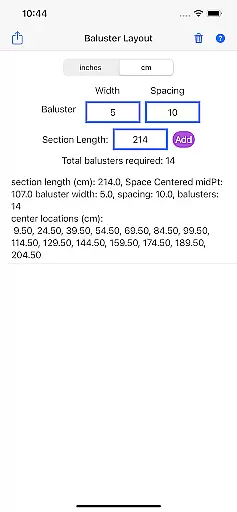
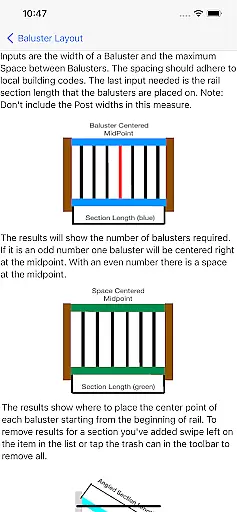
Baluster Layout is a specialized application designed for deck and stair builders, providing an efficient solution for calculating baluster spacing. This app ensures compliance with building codes by offering precise measurements and optimal spacing recommendations.
With its ability to handle multiple rail sections and offer unit flexibility between inches and centimeters, Baluster Layout caters to both simple and complex projects. The detailed results provided help users understand exactly how many balusters are needed and where they should be placed, making it an invaluable tool for professionals and DIY enthusiasts alike.
Whether constructing a new deck or installing a stair railing, this app streamlines the planning process, saving time and reducing errors. By meeting safety standards and enhancing visual appeal, Baluster Layout proves essential for creating structurally sound and aesthetically pleasing installations.
Baluster Layout stands out with its precision spacing feature, which calculates the ideal distance between balusters to meet strict building code requirements. This ensures that every installation not only looks great but also adheres to safety regulations.
The app's support for multiple rail sections allows users to manage intricate projects effortlessly. Each section can have unique dimensions, and the app will provide tailored calculations for each, ensuring accuracy across the entire project.
Unit flexibility is another key aspect, as users can switch between inches and centimeters to match their project specifications. Detailed results further enhance usability by breaking down the number of balusters required and their exact placement, facilitating a seamless construction process.
In the realm of home improvement and construction, having reliable measurements and calculations is essential for ensuring that all components fit perfectly and meet safety standards. Baluster Layout offers a dependable solution for calculating baluster spacing with precision, providing assurance that your railing project will comply with building codes. The app employs an algorithm that takes into account railing length, baluster width, and desired spacing to deliver accurate results every time.
Users can trust the data generated by Baluster Layout due to its meticulous design focused on accuracy. Each calculation considers multiple rail sections, accommodating projects with varying dimensions. This ensures that even the most complex installations are handled with ease, giving users confidence in the authenticity of their project specifications.
The value of using Baluster Layout extends beyond mere number crunching. It provides peace of mind knowing that each baluster's placement has been determined with exactness, which is critical for passing inspections and guaranteeing the structural integrity of your deck or staircase. With this app, builders can avoid potentially costly mistakes while also enhancing the visual appeal of their work through precise arrangements.
Beyond basic calculations, Baluster Layout incorporates features that streamline the entire process of managing a baluster installation project. Its ability to handle multiple railing sections means that users can organize and execute their plans efficiently, without the need for separate tools or manual tracking methods. This comprehensive approach saves time and reduces the likelihood of errors, making it an invaluable asset for both professional builders and DIY enthusiasts.
The app's flexibility in unit selectionu2014offering both inches and centimetersu2014demonstrates its adaptability to different project requirements and regional standards. Such versatility ensures that whether you're working on a small residential deck or a large commercial staircase, Baluster Layout can accommodate your needs seamlessly. Detailed results further enhance usability by breaking down exactly how many balusters are needed per section and where they should be placed.
By integrating these sophisticated home management capabilities, Baluster Layout not only simplifies the task at hand but also elevates overall project quality. Users benefit from organized data presentation, enabling them to focus more on craftsmanship and less on logistics. As a result, creating safe, stable, and visually pleasing structures becomes significantly more achievable with this powerful tool in hand.
Time-saving
Code-compliant
Error reduction
User-friendly
Versatile
Limited design
No offline mode
Basic interface
Few customization
Paid features

Technology powering many in-home services for residents across the United States
 3.80
3.80
Turn your phone into a wifi cam with smart features and umlimited reach.
4.20
Our app allows Sunrun customers to monitor systems, pay bills, and get support.
3.80
Convert your Phone to HiSense Smart TV Remote Control
4.70
The only mappable smart lights for custom decoration.
4.50
Universal Tv Remote Control for all Tv. Cast for chromecast & all Tv Controller
4.20
Samsung remote app helps control all Samsung Smartthings TVs. Fast and Stable!
4.10
Connect with reliable pros for maintenance services, plumbing, and home design!
4.80
Make your phone a surveillance camera remote with a home camera app for Android!
4.40
View houses and apartments for rent, updated daily.
4.80
Download today to join the community to help bring lost pets home faster.
4.70
A Smarter Home in Seconds
4.70
Find homes for sale and apartments for rent in the best neighborhood.
4.70
Parcel Pending Resident App
4.50
Security App with HD Video, 2-way Audio, and event detection for Home monitoring
4.40
For all of your Airthings devices
4.30
AI floor creator to design your dream house, plan rooms & style your home
4.00
Draw your floor plan smartly. Make house design blueprint with home planner app
3.60
Control Fire TV & mirror your phone screen instantly over Wi-Fi.
3.30


User Reviews