
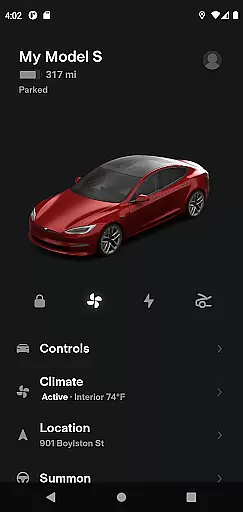
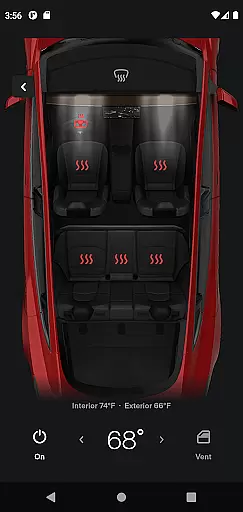
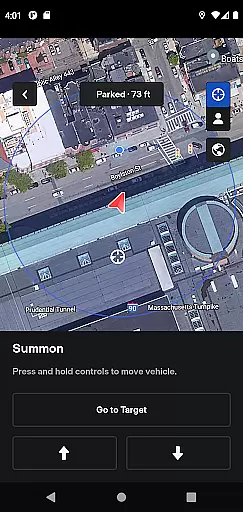
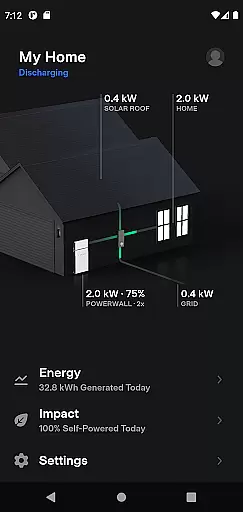
Tesla app is a comprehensive lifestyle tool that connects Tesla vehicle and Powerwall owners with their products. This application allows users to remotely monitor and control charging, climate settings, security features, and navigation functions. It also provides advanced capabilities like Summon for Autopilot-equipped vehicles and detailed energy monitoring for Powerwall 2 users.
The app's real-time connectivity ensures that owners can manage their Tesla ecosystem anytime, anywhere. Whether it's pre-conditioning the car's temperature, locating the vehicle, or controlling media playback, the Tesla app delivers essential convenience features through an intuitive mobile interface. These capabilities make daily vehicle interactions more efficient while enhancing the ownership experience.
The Tesla app offers an impressive array of features that go beyond basic vehicle controls. Users can monitor charging progress in real time and manage temperature settings regardless of the vehicle's location. The remote access capabilities include locking/unlocking, horn/light activation, and panoramic roof control, all designed to enhance user convenience.
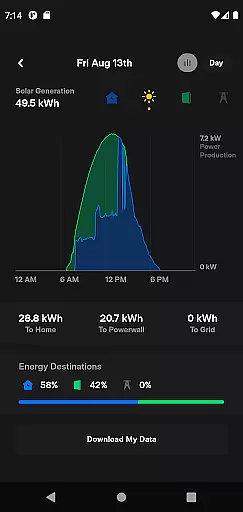
Advanced functionality includes Summon mode for tight parking situations and over-the-air software updates that keep vehicles current with latest features. Powerwall integration provides detailed energy management tools, allowing users to track solar production, home usage, and grid interaction. These features collectively create a seamless connection between drivers and their Tesla products.
What sets Tesla's app apart is its comprehensive approach to vehicle interaction. From sending navigation destinations directly to the car to enabling passenger media control, each feature demonstrates thoughtful engineering. The app particularly excels in its ability to integrate multiple systems - vehicle management, energy monitoring, and navigation - into one cohesive platform.
The Tesla app offers an extensive range of features that cater to various aspects of a user's lifestyle, making it more than just a tool for vehicle management. With functionalities ranging from climate control and charging management to navigation and media control, the app ensures that users have comprehensive control over their Tesla vehicles at all times.
One of the key highlights is its ability to interact with both Tesla cars and Powerwalls, providing a holistic energy solution. Users can monitor solar energy storage, track home energy usage, and even manage energy exports to the grid. This integration of automotive and energy management features into a single application showcases the app's broad lifestyle category coverage.
Additionally, the app supports remote interactions such as locking/unlocking the car, locating the vehicle, and even summoning it from tight spaces. These features are designed to provide convenience and security, ensuring that Tesla owners can seamlessly integrate their vehicles into their daily routines.
When it comes to content authenticity, the Tesla app provides accurate and reliable information directly from the vehicle's systems and Powerwall devices. The real-time data on charging progress, energy storage, and vehicle status is sourced directly from Tesla's secure servers, ensuring that users receive trustworthy and up-to-date information.
Tesla, as a company, has a strong reputation for working with leading experts in automotive and energy technologies. This expertise is reflected in the app's design and functionality, which are developed based on rigorous engineering standards. The app undergoes regular updates to maintain compatibility with new vehicle features and ensure optimal performance.
Moreover, Tesla's commitment to transparency is evident in the detailed energy usage reports and the ability to download solar production data. These features not only enhance user trust but also empower them to make informed decisions about their energy consumption and vehicle usage. Such dedication to accuracy and expert-backed content makes the Tesla app a credible tool for managing both lifestyle and energy needs.
User-friendly interface
Comprehensive vehicle control
Real-time energy monitoring
Remote climate management
Over-the-air updates
Powerwall 1 not supported
Requires cellular connection
Some features need premium package
Limited to Tesla products
Occasional connectivity issues

Unique BIG BOLD TIME with amazing colors and customisations.
 3.70
3.70
Big bold digital watch face with 30 colors, 6 complications and AOD.
4.4
Duo Watch Face (animated)
4.4
BILT interactive 3D instructions help you get the job done right
3.50
Premium floor cleaning robots
4.50
Cute animated Thanksgiving watchface for your WearOS smartwatch
4.2
Play. Earn. Repeat. Get rewarded for playing mobile games. Welcome to Mobius!
4.80
Get the news, events and savings that matter to you with AARP Now.
4.80
Earn money & gift cards when you take surveys, play games, scan receipts & more.
4.50
Countdown to Christmas 2025 with festive games & activities in a virtual village
4.80
Have your Tehillim with you at all times
4.70
Unique "Isometric" style digital watch face for Wear OS
4.50
The Work of Byron Katie— the mobile app for inner peace.
4.40
Going above and beyond known spirit communication
3.60
Unique Dual Colors with 6 Custom Complications for Wear OS watches!
3.40
The Miracle Box includes methods used by Steve Huff of Huff Paranormal.
3.20
LineLearner, the quick way to learn lines.
2.90
Discover how to help puppies stay calm around noise with this helpful app.
4.0
Designed to delight, impress and energize your festive spirit every single day
4.4


User Reviews