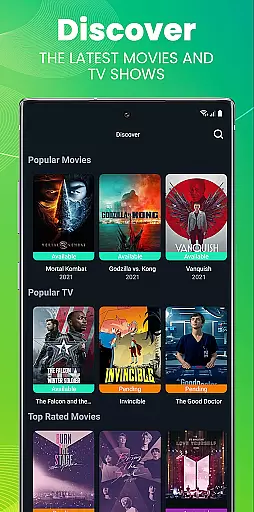
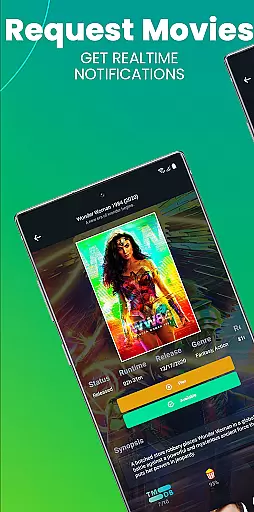
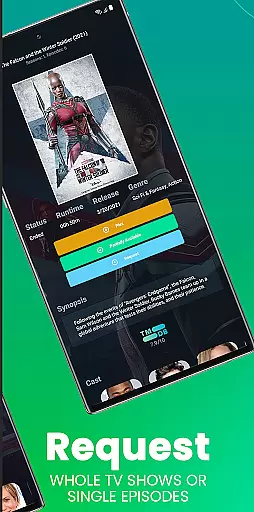
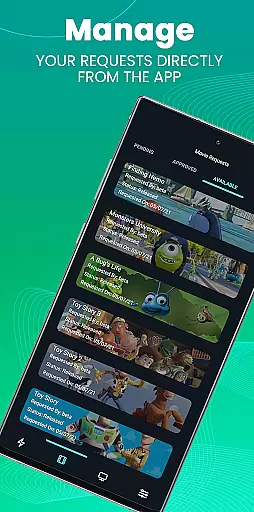
Ombi is a self-hosted entertainment management app that allows users to request TV shows and movies directly from their Plex, Emby, or Jellyfin servers. Designed for seamless integration with DVR tools, it creates an end-to-end content requesting experience. The app requires an existing Ombi server account running version v4.0.13XX or later.
With its user-friendly interface, Ombi empowers shared media users to independently request their favorite content. By scanning a QR code in the web application, users can easily link their mobile app to their Ombi server. This ensures a smooth and personalized experience for managing entertainment libraries.
The app's value lies in its ability to streamline content requests while maintaining compatibility with popular media servers. As updates roll out, Ombi promises enhanced functionality and evolving features, making it an essential tool for home media enthusiasts.
Ombi stands out with its unique combination of features tailored for home entertainment enthusiasts. The app's core functionality revolves around its integration capabilities with Plex, Emby, and Jellyfin servers, allowing users to request content directly from their mobile devices. This seamless connection eliminates manual requests and streamlines the content acquisition process.
One of Ombi's notable features is its QR code authentication system. Users simply log into their Ombi web application, navigate to the Mobile Tab, and scan the provided QR code to establish a secure connection between their mobile app and server. This innovative approach to authentication ensures both security and convenience.
The app also supports multiple DVR tools, creating a comprehensive ecosystem for managing entertainment requests. While currently focused on basic functionality, Ombi's development roadmap promises expanded features and improved user interface elements, making it a future-proof solution for home media management.
Ombi offers a diverse range of content options by integrating with Plex, Emby, and Jellyfin, allowing users to request TV shows and movies effortlessly. This integration ensures that users have access to the latest media releases, keeping the content library fresh and engaging.
The application supports multiple DVR tools, which enhances the variety of content available for requests. By linking these services, Ombi creates a seamless experience where users can easily find and request their desired content without any hassle.
With its self-hosted nature, Ombi provides flexibility in managing and updating the content library. Administrators can ensure that the platform evolves over time, adapting to new features and updates, thus maintaining a dynamic and up-to-date entertainment repository.
Ombi is designed to keep users engaged by providing an intuitive interface for requesting media content. The ability to scan a QR code for login simplifies the user experience, encouraging longer interaction with the app as users explore available content options.
By enabling shared users to independently request content, Ombi fosters a sense of ownership and involvement. This autonomy not only boosts user satisfaction but also increases the likelihood of continued usage and retention over time.
As the platform evolves with future updates, more functionalities will be introduced, further enhancing user engagement. These ongoing improvements aim to maintain high levels of user interest and participation within the Ombi ecosystem.
User-friendly interface
Seamless server integration
Secure QR login
Multi-platform support
Regular updates
Requires existing server
Limited standalone use
Version dependency
No direct streaming
Setup complexity

Create, chat & bond with AI souls who truly listen.
 4.50
4.50
Rain and lightning effects for your Philips Hue lights
4.30
Simulation of Dashboard / Touch Screen for Tesla. (Works without actual Tesla).
4.2
Pathfinder 2e initiative tracker with bestiary, HP, reaction, conditions, etc
4.80
Chat with AI characters! Anime, games, roleplay & more.
4.50
Fetch money rewards all just for playing games. Cash out for gift cards in app.
4.50
The Xbox app keeps you connected to your gaming community.
4.50
NFL, NBA, NHL, MLB, local sports coverage, shows, movies & news!
3.20
Earn big rewards like PayPal & Amazon gift cards by playing games you love!
4.30
Open-source, fast, simple and powerful IPTV app
4.90
The OFFICIAL PeeWee Purpdrank Soundboard!
4.80
Time tracking, lap counting and much more for Carrera® Digital 132/124
4.80
Watch Reels, Drama Shorts & TV Series Anytime. Download DramaWave Now!
4.70
Watch short films, dramas, reels, series and movies anytime on Micro Drama.
4.60
Direct access to the most complete Guitar Tab Archive in Spanish: LaCuerda.net
4.60
Series,Películas y Telenovelas
4.50
Binaural Brainwave Doses for Every Imaginable Mood
3.60
With the Steam Mobile App, you can take Steam with you anywhere.
3.00
With the credits you earn play more games
2.90


User Reviews