
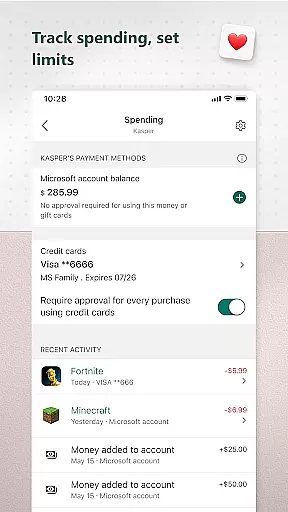
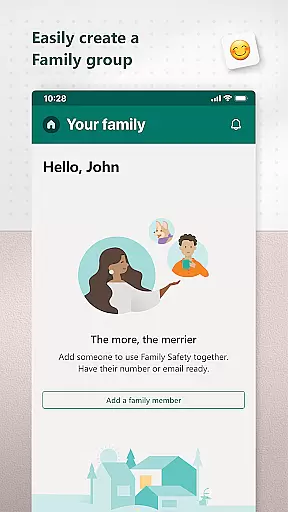
Microsoft Family Safety is a comprehensive parenting app designed to help families develop healthy digital habits while ensuring children's safety online. The app allows parents to set up parental controls, manage screen time, and filter inappropriate content across multiple devices including Android, Xbox, and Windows.
A key feature of the app is its activity reporting system, which provides parents with detailed insights into their children's digital activity through weekly email summaries. This helps facilitate open conversations about responsible device usage. For kids, the app ensures they can safely explore the digital world within the boundaries set by their parents, accessing only age-appropriate content.
The app also offers tools for managing location sharing, web browsing restrictions, and app usage limits, making it an essential tool for modern families looking to balance digital freedom with safety.
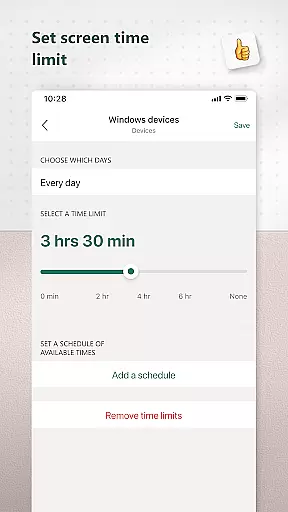
Microsoft Family Safety stands out with its robust set of features tailored for both parents and children. One of its core functionalities is the screen time management system, which allows parents to set specific time limits on apps, games, and devices across platforms like Xbox, Windows, and Android. Parents can also receive notifications when their child requests additional screen time.
Another notable feature is the content filtering system. It enables parents to block inappropriate apps and games while setting up kid-friendly browsing options on Microsoft Edge. The app's activity reports provide valuable insights into children's screen time and app usage patterns, helping parents guide their kids toward healthier digital habits.
Additionally, the app emphasizes privacy protection. With explicit consent from children, it uses accessibility and device admin permissions to monitor app usage and restrict access to unauthorized applications. These features collectively create a safer digital environment for families without compromising individual privacy.
Microsoft Family Safety provides a reliable and credible solution for parenting in the digital age. The app is designed to help parents create a safe online environment for their children by setting parental controls that filter inappropriate content.
The features are developed with expert insights, ensuring that the tools provided are not only effective but also age-appropriate. This includes web filters for kid-friendly browsing on Microsoft Edge and the ability to block inappropriate apps and games, which are crucial for protecting young minds.
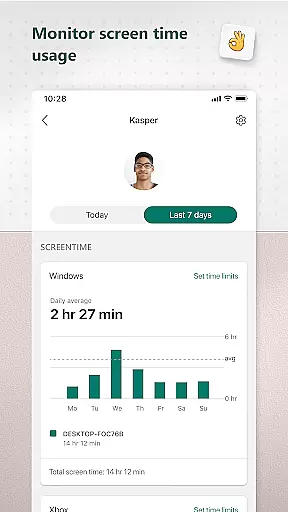
Parents can trust the app's activity reporting feature, which offers a detailed log of screen time and online usage. These reports are not just data dumps but are crafted to help develop healthy digital habits through meaningful insights.
With weekly email summaries, parents can stay informed about their children's digital activities, facilitating open conversations about online behavior. This level of transparency and control empowers parents to guide their children's growth in the digital world confidently.
Accurate growth tracking is essential for understanding a child's development, and Microsoft Family Safety excels in this area. The app provides precise monitoring of a child's digital activity, offering parents a clear view of their screen time and app usage across multiple devices.
Through advanced device management features, parents can set specific time limits on apps and games on Android, Xbox, or Windows platforms. This ensures that children are not only learning to manage their own time but are also developing a balanced approach to technology use.
When a child requests more screen time, parents are promptly notified, allowing them to make informed decisions about adjusting limits or granting additional access. This real-time interaction ensures that growth tracking is not a passive activity but an engaged process.
By adhering to strict privacy standards, Microsoft Family Safety guarantees that the data collected is used solely for empowering parents. With meaningful choices about data collection and usage, parents can rest assured that their family's information is handled with care and respect.
Comprehensive cross-platform support
Effective screen time management
Detailed activity reporting
Robust content filtering
Strong focus on user privacy
Limited iOS compatibility
Requires child consent
Premium features locked behind subscription
Occasional syncing delays
Complex setup process

Block apps, set screen time limits, and customize usage schedules
 4.50
4.50
Family parental control app: limit screen time, block apps, GPS tracker.
4.20
Protect kids online safety through GPS tracking,screen time control,app blocking
4.20
The 10 development leaps of your baby | newborn milestones & leap days tracker
4.10
Lullabies, Night Light & Age-based Routines to help your baby fall asleep
4.3
Babysitting video camera - Turn your two phones or tablets into a single nanny.
4.40
Keep track of your stored breastmilk
4.40
Screen Time, App and Web Block & Monitoring, Location Tracker
3.60
Pregnancy+ App has helped 80m moms track their pregnancy with info & support!
4.80
Kids story books for children. Baby reading books with audio for pre-k toddlers
4.70
Fun Ideas for Parents
4.70
GPS tracker app: Simple GPS phone tracker for fast family location tracking
4.60
GPS phone tracker: find kids on map. Location tracking and parental control.
4.50
Find unique + popular baby names for your little peanut.
4.30
Pregnancy and baby formula tips for moms, plus Enfamil coupons & cash back
4.10
Discover fun videos, kids songs, bedtime stories and games
3.60
A Coloring for the Whole Family! Discover the Joy of Family Love Through Colors!
3.60
Happiest Baby App replaces the SNOO App (the mobile companion to SNOO & SNOObie)
3.20
AI Motion Video Maker & Ideas
4.0


User Reviews