

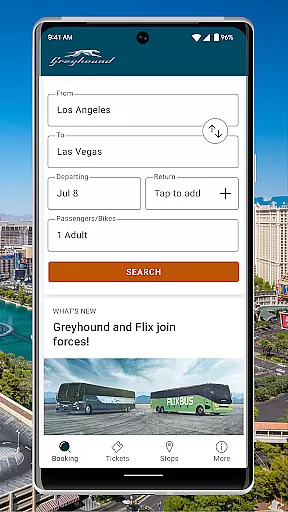
Greyhound is a premier travel app designed for booking low-fare bus tickets with enhanced flexibility and options. The app provides users with access to an extensive network of over 1900 bus routes across North America, including popular routes like Boston to New York and Los Angeles to Phoenix. With its refreshed interface, Greyhound now supports both Greyhound and FlixBus carrier schedules, offering more choices for travelers.
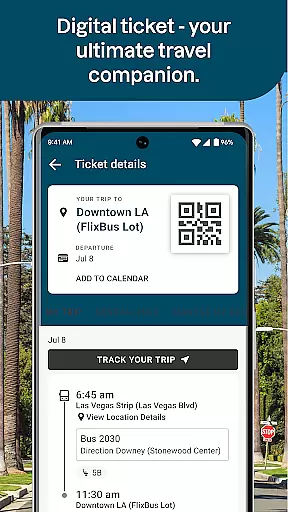
Key features include the ability to choose preferred seats on the bus, live trip updates, and seamless ticket management through QR codes directly in the app. Whether you're traveling for leisure or business, Greyhound ensures convenience by eliminating the need for paper tickets and offering mobile-only discounts. This makes it an ideal solution for budget-conscious travelers seeking efficiency and ease in their transportation experience.
The Greyhound app stands out with its robust set of features tailored to enhance the travel experience. One of its core functionalities is the integration of multiple carrier schedules, including both Greyhound and FlixBus, which allows users to view and book from a wider range of travel options. This expanded scheduling capability ensures that users can find the most convenient and cost-effective travel times.
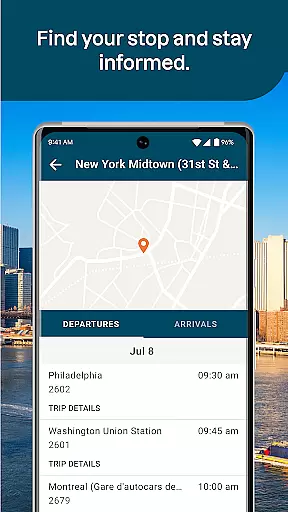
Another notable feature is the seat selection option, where passengers can choose their preferred seating arrangement—whether it's a window or aisle seat—for a small fee. Additionally, the app offers live trip updates, ensuring travelers are always informed about their journey status. Users can also take advantage of exclusive app-only discounts, making travel even more affordable. These features collectively provide a seamless, user-friendly experience that prioritizes convenience and savings.
Ensuring booking authenticity is crucial for travelers using the Greyhound app. This app provides reliable and verified bus ticket bookings across more than 1900 routes in North America.
The Greyhound app allows users to see and book schedules from both Greyhound and FlixBus carriers, ensuring that customers have access to a wide range of low-fare options. With real-time trip updates available directly through the app, passengers can trust that their booking information is accurate and up-to-date.
Users benefit from the ability to show their tickets directly from the app, thanks to an integrated QR code system. This eliminates the need for physical tickets and assures passengers that their digital ticket is authentic and accepted by drivers.
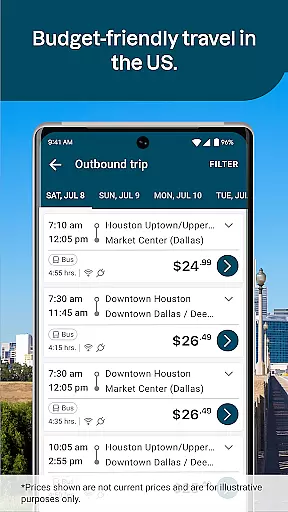
Price transparency is a significant advantage when booking bus trips with the Greyhound app. The app offers clear pricing for its extensive network of routes, ensuring customers know exactly what they are paying for.
With the option to choose and pay for preferred seats on the bus, users are given a transparent view of any additional fees associated with seat selection. If they prefer not to pay the extra fee, the app will automatically assign a seat at no additional cost, maintaining clarity in pricing.
Additionally, Greyhound enhances price transparency by offering app-only discount emails. These targeted offers provide users with opportunities to save on their bookings, making certain that customers are aware of how they can access the best possible fares.
User-friendly interface
Wide route coverage
Live trip updates
Mobile ticketing
Exclusive discounts
Seat selection fee
Limited international routes
Occasional app glitches
Ads within app
Variable customer support

Plan where to stand and shave minutes off your trip!
 4.80
4.80
View current Montana road conditions, cameras, plows, and timelapse videos.
4.70
Take JetBlue everywhere you go! Book, manage and check in for your trips & more.
4.60
Replace your car trips with the world’s largest shared electric vehicle company.
4.90
The official app of Allegiant Travel & Allegiant Airlines
3.30
Everything you need for your trip in one place with the Volaris app.
3.60
Walt Disney World Resort maps, wait times, tickets, dining & more.
4.50
Link & locate for real-time child & family safety: GPS tracker for families
4.40
Flight booking, hotel booking & more - all in one place with the Southwest App!
4.50
Book your whole trip in one app.
4.80
Meet Allyz®, your ultimate travel companion
4.70
With the Spirit Airlines app, easily manage all your trips in one place.
4.70
Get all MTA services, Subway, Bus, LIRR, Metro-North and More all in one place.
4.60
Easily rent a car at over 9,500 locations with the Enterprise car rental app.
4.60
Download now and start earning rewards on hotels, tours, and everything travel.
4.50
Earn hotel and travel rewards, find hotel offers, and access your Digital Key.
4.50
MyTSA gives you 24/7 access to info that passengers frequently request from TSA.
4.10
INDOT Trafficwise is a traffic and traveler information mobile app.
4.00
Real-time flight tracking with live maps and flight status updates.
3.70


User Reviews