
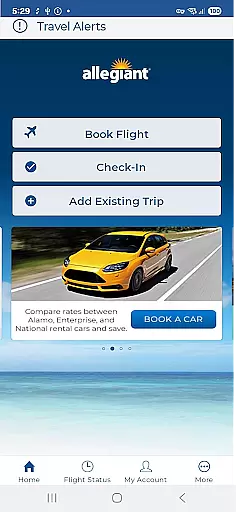
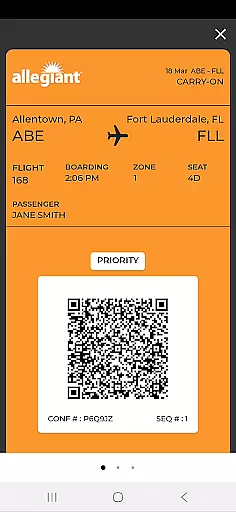

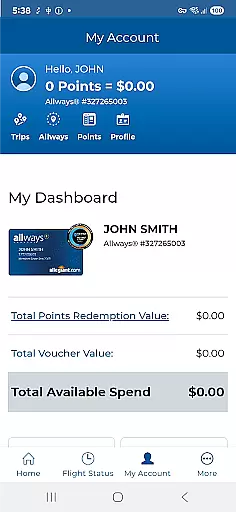
Allegiant is a comprehensive travel application designed specifically for Allegiant Travel and Allegiant Airlines customers. The app allows users to book flights, manage trips, check in for flights, and display boarding passes directly on their mobile devices. With its intuitive timeline-based card system, passengers can easily follow each phase of their journey.
In addition to basic booking functions, the app provides essential features such as seat selection, baggage purchase, and Priority Boarding upgrades. Users can also receive real-time flight status notifications and access various self-service options. This makes the entire travel process more efficient and paperless, saving both time and money for travelers.
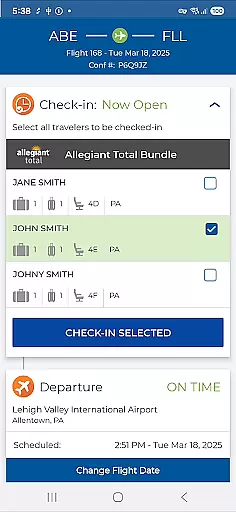
One of the standout features of Allegiant is its innovative trip management system. Each phase of the journey is represented as a card in a timeline, allowing users to seamlessly manage their trips by simply tapping on the relevant cards. This functionality includes checking in for flights, viewing boarding passes, and accessing departure and arrival information.
The app also offers convenient self-service options. Users can review upcoming trips, automatically download trip details when logged into their My Allegiant account, add seats, purchase bags, and upgrade to Priority Boarding. Additionally, passengers can provide feedback about their travel experience directly through the app, ensuring continuous improvement in service quality.
Another key feature is the ability to receive important flight status notifications. These alerts keep passengers informed about any changes or updates to their flight schedules, helping them plan their journeys more effectively. The app's comprehensive functionality makes it an indispensable tool for modern travelers seeking convenience and efficiency.
Booking authenticity is a crucial aspect of any travel application, ensuring that all reservations and transactions are legitimate and verifiable. The Allegiant app excels in this area by providing secure booking directly through its platform.
When passengers book their flights via the app, they receive immediate confirmation of their reservation. This digital verification process eliminates the uncertainty that can come with third-party bookings or offline transactions.
The app's integration with Allegiant Airlines' systems ensures that every booking is accurately reflected in real-time. Users can view their upcoming trips, make changes to their reservations, and access their travel documents with ease.
This level of booking transparency not only builds trust with users but also streamlines the entire travel experience. From initial booking to airport check-in, passengers can be confident in the authenticity of their travel arrangements.
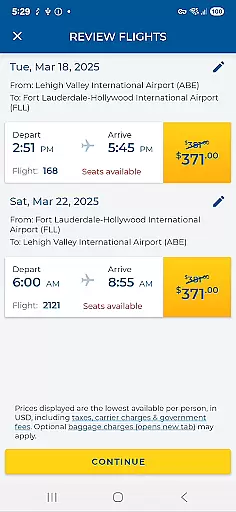
Price transparency in travel applications refers to the clear display of all costs associated with a booking, preventing unpleasant surprises for travelers. The Allegiant app demonstrates excellent price transparency throughout the booking process.
Users can view detailed pricing information when searching for flights, including base fares, taxes, and additional fees. This comprehensive breakdown allows travelers to make informed decisions about their purchases.
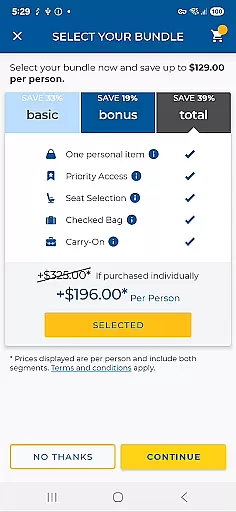
The app also provides visibility into optional services such as seat selection, baggage fees, and priority boarding costs. Customers can review these options before finalizing their booking, ensuring they understand the total cost of their journey.
This transparent approach to pricing helps build customer confidence and satisfaction. By presenting all costs upfront, the Allegiant app enables travelers to budget effectively and avoid unexpected charges during their trip.
User-friendly interface
Comprehensive trip management
Real-time notifications
Self-service options
Cost-saving features
Limited to Allegiant Airlines
Occasional bugs reported
Requires account login
No offline functionality
Ads within the app

Locate and navigate to local holiday displays
 4.1
4.1
A Camino de Santiago Guidebook from St. Jean Pied de Port to Santiago
3.60
Meet Allyz®, your ultimate travel companion
4.70
GPS Live Satellite Earth to find route navigation and current location map
4.00
Maps, Wait Times, Park Hours
4.40
Get faster fuel rewards, exclusive offers, and helpful tools!
4.70
Download now and start earning rewards on hotels, tours, and everything travel.
4.50
Offline WiFi Hotspot Finder, eSIM, Caller ID, Dialer, Home Screen Launcher & VPN
4.20
Manage your travel on Delta with access to boarding passes, flight info & more.
4.80
It drives. You ride.
4.90
Streamline your U.S. entry
4.90
Book flight, car or packages. Instant access to hotel discounts & travel deals
4.80
Frontier’s Android app makes travelling easier than ever before!
4.70
Walt Disney World Resort maps, wait times, tickets, dining & more.
4.50
Earn hotel and travel rewards, find hotel offers, and access your Digital Key.
4.50
Stack Upside with your current credit & debit rewards for even more cash back!
4.50
Navigate your world faster and easier with voice navigation & street view map
4.20
Everything you need for your trip in one place with the Volaris app.
3.60
Every Diners, Drive-in & Dives location in one place! Your guide to Flavortown!
3.00


User Reviews