
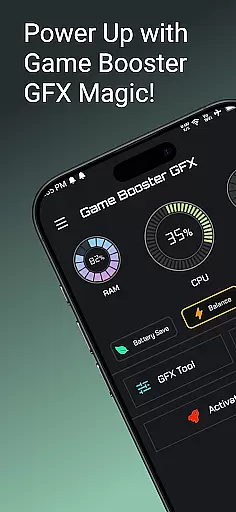
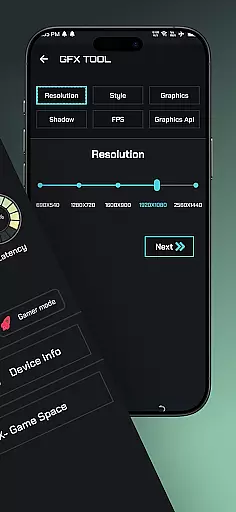
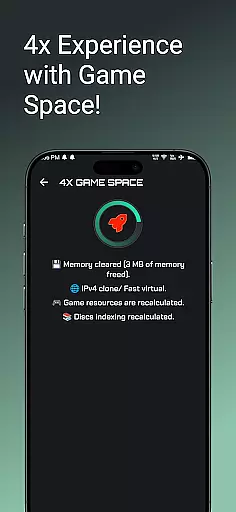
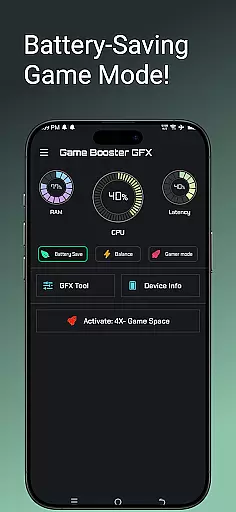
Game Booster GFX 4x is a powerful tool designed to enhance your mobile gaming experience. This app allows gamers to optimize their device performance specifically for gaming, offering features like 4x Game Space expansion and customizable resolution settings. With support for up to 120 FPS on compatible devices, it ensures smoother gameplay without lag. The Gamer Mode and GFX Tool provide additional customization options, letting users tailor graphics styles and unlock extreme frame rates.
The application is particularly beneficial for competitive gamers who require optimal performance from their devices. By unlocking higher frame rates and providing various graphic enhancement options, Game Booster GFX 4x helps players enjoy an immersive gaming experience with ultra HD and HDR graphics. Whether you're playing fast-paced action games or visually stunning adventures, this app ensures your device performs at its best.
Game Booster GFX 4x offers a comprehensive suite of features tailored for mobile gamers. One of its standout capabilities is the GFX Tool, which allows users to customize game resolution and choose from multiple graphic styles such as Realistic, Colorful, Soft, and Classic. This flexibility ensures that players can adjust visual settings to their preference, enhancing both aesthetics and performance.
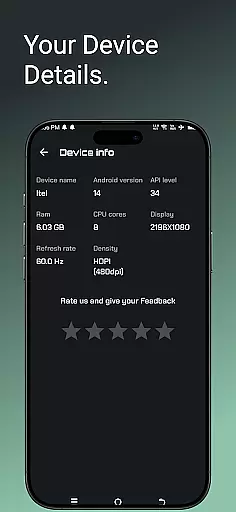
In addition to graphic customization, the app provides essential functionalities like Device Info and Gamer Mode. Device Info gives users insights into their hardware specifications, helping them understand how different settings might impact performance. Gamer Mode optimizes the device for gaming sessions by prioritizing resources and reducing background activity. These features collectively contribute to a seamless gaming experience, free from interruptions and lag.
Furthermore, Game Booster GFX 4x supports extreme frame rates of up to 90 and 120 FPS on supported devices, making it ideal for competitive gaming scenarios where every millisecond counts. The ability to unlock these high frame rates ensures that players can react faster and enjoy smoother animations during gameplay.
Game Booster GFX 4x offers a comprehensive suite of features designed to enhance gaming performance. The app includes a 4x Game Space feature that optimizes device resources, ensuring games run smoothly without lag.
The GFX Tool allows users to customize resolution settings and unlock extreme frame rates up to 120 FPS on supported devices. This level of control over graphical settings ensures an optimal balance between performance and visual quality.
With additional features like Device Info and Gamer Mode, the app provides complete coverage of gamers' needs. These tools help users monitor their device's capabilities and optimize settings for the best possible gaming experience.
The combination of these features demonstrates the app's commitment to functionality completeness, making it a valuable tool for mobile gamers looking to maximize their device's potential.
Usability is at the core of Game Booster GFX 4x's design philosophy. The app features an intuitive interface that makes it easy for users to access and modify game settings, even for those who may not be technically inclined.
Operational smoothness is ensured through the app's lightweight design and efficient resource management. By optimizing device performance without consuming excessive system resources, the app maintains a seamless user experience.
Gamer Mode exemplifies the app's focus on usability by providing one-touch optimization. This feature simplifies the process of enhancing game performance, allowing users to quickly activate pre-configured settings for their favorite games.
The app's smooth operation extends to its ability to maintain stable performance during extended gaming sessions, preventing crashes and minimizing interruptions to the gaming experience.
Enhances gaming performance
Customizable resolution settings
Supports high frame rates
User-friendly interface
Multiple graphic styles
Limited to supported devices
Potential battery drain
May cause overheating
Not all games compatible
Requires technical knowledge

Record with Double Camera Video Recording using Dual Camera Front and Back Video
 3.00
3.00
Read Holy Quran Feel Like Real Quran & Listen Al Quran Mp3 Audio Online Offline.
4.70
If you are looking for melon playground mod that fun you deffinitely try our app
2.70
A great tool help you to format Micro SD memory Card
3.10
Block, disable and secure phone camera from secretly taking photos by spyware.
4.50
Enjoy hours of entertainment with our Roblox mobile games app
4.5
Looking to connect your phone to your car screen? Mirror Link is the solution.
3.20
Turn your phone into a wireless Xbox controller – play, stream & control anytime
4.0
DamonSx2 is the open Source LGPL Emulator
3.20
SmartCast mirrors Android phone to TV screen With Cast Screen, Chromecast.
4.80
Demo for Key Attestation feature of the Android system.
4.80
TV USB connector app provides you a seamless cast option from your phone to tv.
4.70
Game booster GFX may reduce interruptions and improve gaming experience.
4.50
Phone Software Update Quick Checker helps you to keep your phone apps up to date
4.50
Test DPC is a sample device policy controller for use with Android Enterprise.
4.20
Sad ringtones full of feeling, sad music ringtones
3.90
Connect and find your Smart Tag 2 devices through our app.
3.60
CloudEye 365 is a easy-handling APP
3.60
Now Available on Android ™
3.40


User Reviews