
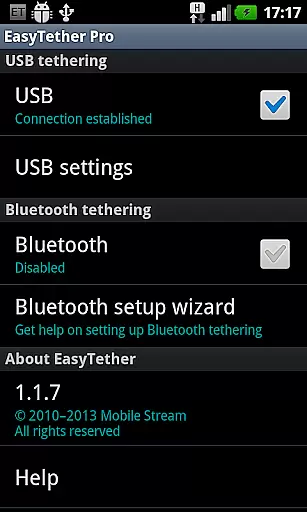
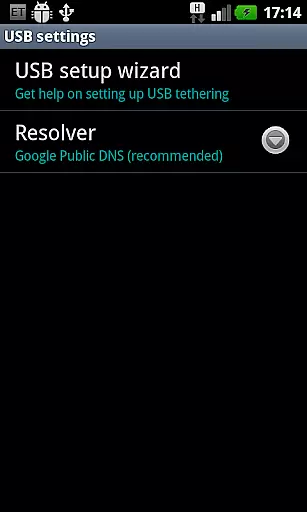
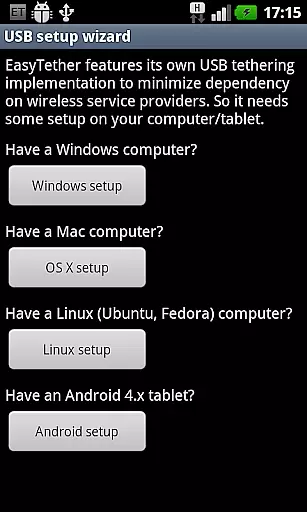
EasyTether Pro is a communication app designed to share your smartphone's Internet connection with other devices, including computers and tablets. It supports both USB and Bluetooth tethering, making it versatile for Windows, Mac OS X, Linux, and Android 4.x tablets. The app does not require root access or special tethering plans, ensuring ease of use while offering advanced features like PS3, Xbox, and Wii tethering through Internet connection sharing on Windows or Mac.
This app is ideal for users who need a reliable way to connect multiple devices to the Internet without relying on Wi-Fi or mobile hotspots. With its one-time fee structure, EasyTether Pro provides an affordable solution for tethering needs, whether you're at home, in the office, or traveling.
EasyTether Pro stands out with its comprehensive tethering options. The app supports USB tethering for Windows, Mac OS X, and Linux computers, as well as Android 4.x tablets, ensuring broad compatibility across different platforms. Additionally, Bluetooth tethering is available for Windows computers and Android 4.0.3+ tablets, providing flexibility for various connectivity scenarios.
One of the key advantages of EasyTether Pro is that it doesn't require root access or special tethering plans, which simplifies the setup process and reduces costs. The app also supports tethering for gaming consoles like PS3, Xbox, and Wii by leveraging Internet connection sharing on Windows or Mac systems. This makes it a powerful tool for gamers who want to enjoy online gaming without needing a separate Internet connection.
Real-time messaging speed and reliability are crucial for seamless communication in any application. EasyTether Pro excels in this area by ensuring that your internet connection is shared instantly and consistently between devices.
The app employs advanced tethering technology, allowing users to share their smartphone's internet with computers or tablets via USB or Bluetooth. This ensures a stable connection without the need for root access or special tethering plans.
Whether you're using Windows, Mac OS X, Linux, or even gaming consoles like PS3, Xbox, and Wii, EasyTether Pro provides reliable internet sharing through its compatibility with various platforms. The setup wizard guides users through the process, making it easy to establish a dependable connection.
With one-time fee pricing and support for multiple devices, EasyTether Pro offers an efficient solution for real-time communication needs, ensuring users stay connected without interruptions.
Media sharing support is essential for users who need to transfer files between devices seamlessly. EasyTether Pro facilitates this by enabling internet connection sharing from smartphones to other devices such as computers and tablets.
By supporting both USB and Bluetooth tethering, the app allows for flexible media sharing options. Users can connect their Android 4.x tablets or Windows computers effortlessly, ensuring that files are transferred quickly and securely.
EasyTether Pro stands out with its ability to function without requiring root access or specific tethering plans. This makes it accessible for a wide range of users who want to share media without worrying about carrier restrictions or additional costs.
In addition to basic file sharing, EasyTether Pro also supports internet connection sharing for gaming consoles like PS3, Xbox, and Wii. This versatility ensures that users can enjoy uninterrupted media streaming and downloads across different platforms.
User-friendly interface
No root access required
Supports multiple platforms
Affordable one-time fee
Versatile tethering options
Limited free version
Requires initial setup
Bluetooth speed may vary
Not all carriers support
Removal of older versions needed

Official NDI app: turn your phone into a professional live-streaming IP camera.
 3.20
3.20
This app enables the phone to receive and send FT8 traffic!
3.80
Message and video call your family and friends in HD!
3.80
Simplify texting with Messages SMS, offline messaging, themes & smart tools!
4.30
Chill zone on your phone: relax with fun reels & hype shorts!
4.20
Watchgram for Telegram: Experience seamless Telegram messaging on your watch
1.80
RemoteHams.com Android RCForb Client Pre-Release
4.30
TeamSpeak - Secure Chat for Gaming & Business
3.10
Fast internet with AI, Adblock & VPN. Browse on a safe, incognito web browser.
4.70
Use this Dialer app alone or as a TREK: Total Interface companion.
4.70
Browse fast on Opera Mini, with Data Saving, News, Football Scores, and Download
4.60
Connect and browse the internet with a fast VPN proxy server and IP blocker.
4.50
Faster version of Messages. Messenger for your contacts.
4.50
Create a secure hotspot on-the-go with Portable WiFi - Mobile hotspot.
4.40
Caller ID App! Add names & photos to unknown calls & Call Recording
4.40
Phone Dialer with Caller ID, Address Book & Contacts Manager.
4.30
Call Blocker app: Identify unknown callers, block spam calls, fraud & robocalls
4.30
SMS & MMS Messaging App to easily send messages or schedule SMS on Chat
4.10
A softphone with crystal clear SIP Calling & Reliable VoIP dialer
4.00


User Reviews