
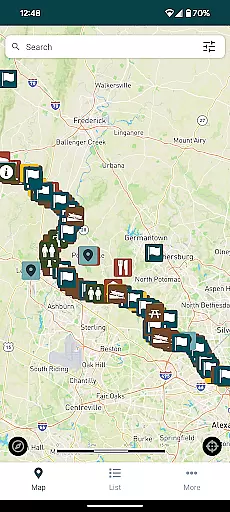
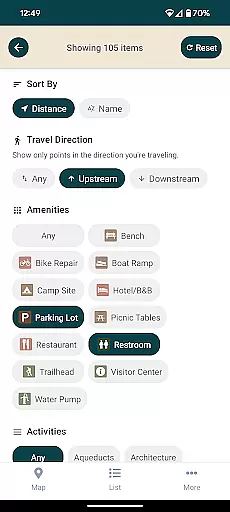
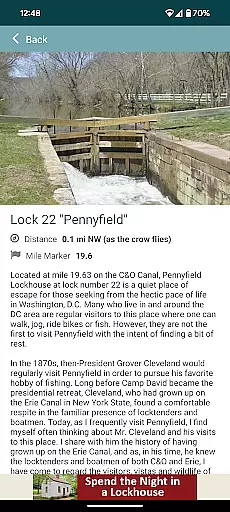
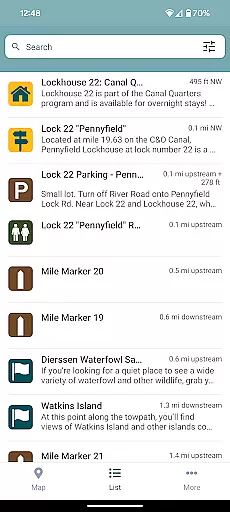
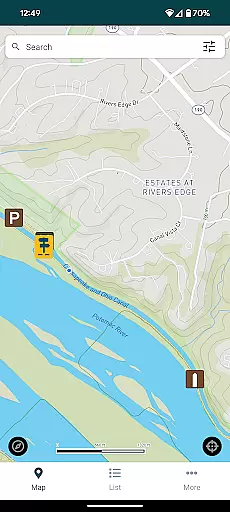
C&O Canal Explorer is a comprehensive navigation app designed to help users explore the entire 184.5 miles of the C&O Canal National Historical Park. The app serves as an essential tool for outdoor enthusiasts, providing access to over 800 meticulously mapped points of interest. These include hiking trails, campgrounds, historical sites, trailheads, and parking areas, all presented in a user-friendly searchable format.
One of the standout features of this app is its ability to calculate distances from your current location to nearby amenities and points of interest. Whether you're planning a day hike or a multi-day camping trip, the app's intelligent distance calculation ensures you can efficiently plan your journey. This functionality makes it particularly useful for adventurers looking to discover new paths and explore lesser-known parts of the park.
The C&O Canal Explorer app represents a collaboration between the C&O Canal Trust and the National Historical Park, aiming to enhance visitors' experiences while promoting conservation efforts. By providing detailed information about the park's diverse offerings, the app encourages users to engage more deeply with the natural and historical treasures of the C&O Canal, ultimately contributing to its preservation for future generations.
The C&O Canal Explorer app boasts an impressive array of features that cater to various types of park visitors. At its core, the app provides an extensive database of over 800 points of interest, each carefully categorized and geolocated. Users can easily search for specific types of locations, such as historical landmarks, recreational areas, or essential amenities, using the app's intuitive filtering system.
A key distinguishing feature is the app's sophisticated distance calculation tool. This function not only shows the exact distance to nearby points of interest but also helps users optimize their routes based on their current position. The app achieves this through advanced GPS integration and mapping technology, ensuring accurate location data even in remote areas of the park.
Additional notable features include offline access capabilities, allowing users to download maps and information for use without cellular service. The app also incorporates educational content about the canal's rich history, making it an invaluable resource for both casual visitors and history enthusiasts. Furthermore, its user-friendly interface and responsive design ensure seamless navigation across different devices, enhancing the overall user experience while exploring the vast expanse of the C&O Canal National Historical Park.
Map accuracy is essential for any navigation app, and the C&O Canal Explorer excels in this area. The app provides precise mapping of over 800 points of interest along the 184.5 miles of the C&O Canal National Historical Park.
Each location, from hiking trails to historical sites, is carefully plotted to ensure users can rely on the information provided. This meticulous attention to detail guarantees that adventurers can explore with confidence, knowing their destinations are correctly marked.
The app's developers have integrated advanced GPS technology to offer real-time location tracking. This feature ensures that visitors can accurately pinpoint their current position relative to the attractions they wish to visit.
By delivering trustworthy geographic data, the C&O Canal Explorer app enhances the overall experience of park exploration. Users can enjoy their outings, fully assured that the distances and directions provided are reliable and up-to-date.
Route planning is a core functionality of the C&O Canal Explorer app, designed to enhance visitor experiences within the C&O Canal National Historical Park. The app offers intuitive tools that allow users to map out their journeys efficiently.
With an extensive database of trails, campgrounds, and other points of interest, the app calculates the distance from your current location to desired destinations. This helps users create customized itineraries tailored to their interests and time constraints.
Moreover, the app suggests optimal routes based on user preferences, ensuring a smooth and enjoyable travel experience. Whether planning a short hike or a multi-day adventure, explorers can rely on these suggestions to make informed decisions about their trips.
By providing comprehensive route planning capabilities, the C&O Canal Explorer app empowers users to maximize their exploration of the park while minimizing logistical challenges. This thoughtful approach makes every visit both seamless and memorable.
User-friendly interface
Comprehensive point database
Accurate GPS integration
Offline functionality
Educational historical content
Limited to specific park area
Occasional GPS inaccuracies
No live tracking feature
Basic visual design
Restricted customization options

Route schedules, maps, and real-time tracking of MTA buses in New York City.
 4.20
4.20
OpenCPN is a full featured ChartPlotter and Navigator for Android.
3.60
Find radar maps, GPS coordinates, altitude, offline maps, location, travel route
4.40
Phone Tracker and GPS Location Sharing
4.20
Explore Live Earth Map with 3D World Map & locate cites, mountains real time.
3.80
ParkWhiz, an Arrive Mobility brand, part of the Arrive Network
4.30
Live Satellite view app for find GPS navigation Direction and live location map
3.70
Get real-time bus and train schedules for easy, hassle-free city transportation.
3.90
Track friends in real-time and explore worldwide live cameras.
4.60
Offline maps & GPS for hiking, travel, fieldwork & outdoor adventures
4.70
Ride or drive at YOUR price
4.70
America’s largest public fast charging network, with over 500 charging stations.
4.50
Affordable rides and food delivery with incredible discounts in just one app.
4.50
Lets explore the world's famous places by using Live Cams, GPS & Satellite View.
4.20
Get directions, Maps, GPS navigation & GPS Maps using GPS App
4.10
Get route, find shortest path, near by places and weather update
3.90
Explore offline maps with radar, satellite view, and real-time alerts.
3.60
Play in the outdoors with Android as your Handheld GPS and offline topo maps!
3.50
Off-Roading Navigation App With Trails, Public Lands, & Private Property Info
3.30


User Reviews