








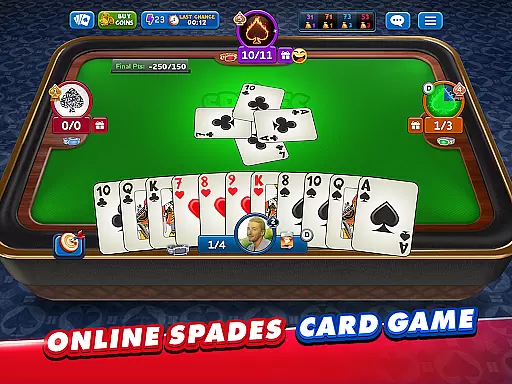









Spades Plus is a premier online card game that brings the classic trick-taking game to life with millions of players worldwide. As a member of the Spades community, you can enjoy various game modes including Classic, Solo, Mirror, and Whiz, each offering unique challenges and gameplay styles. Whether you are an experienced player or new to Spades, this app provides an engaging platform for all skill levels.
The app stands out with its social features and competitive elements such as Tournaments and Knock-Out challenges, allowing players to win amazing prizes. With options to create custom tables and chat with other players, Spades Plus offers a comprehensive and interactive gaming experience. The ability to customize game rules and settings ensures that every match can be tailored to your preferences, making it a versatile choice for card game enthusiasts.
Accessible on Android devices, Spades Plus not only entertains but also connects people globally through its multiplayer functionality. Its appeal lies in the combination of traditional card game mechanics with modern social and competitive aspects, providing both casual and serious gamers with endless hours of enjoyment.
Spades Plus boasts a rich array of features designed to enhance your gaming experience. One of the standout features is the availability of different game modes such as Classic, VIP, Solo, Mirror, and Whiz. Each mode caters to different play styles, ensuring that there is something for everyone. For instance, Classic mode lets you team up with a partner to challenge other teams, while Solo mode focuses on individual performance.
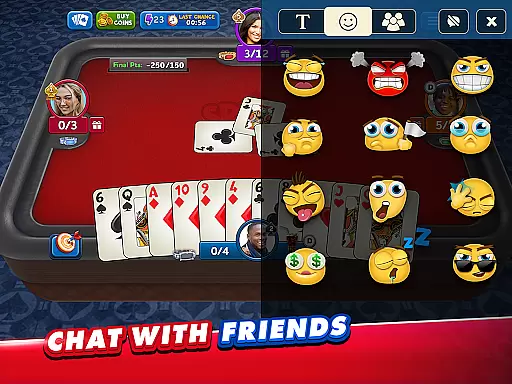
In addition to diverse gameplay options, Spades Plus offers exciting Tournaments and Challenges where you can compete against 16 players to win incredible rewards. The social aspect is amplified with public and private chat functionalities, enabling you to connect with friends and meet new players. You can even create your own tables with customizable rules, bet amounts, and final points, adding another layer of personalization to your games.
Visually, the app allows you to collect new deck designs through seasonal competitions, letting you showcase your unique style during matches. Coupled with daily bonuses and a welcome bonus of 20,000 free coins, Spades Plus ensures that players have ample resources to enjoy the game to its fullest potential. These features collectively contribute to a dynamic and engaging card gaming experience.
Random Number Generation (RNG) is crucial in card games to ensure that every shuffle and deal is unpredictable and fair. Spades Plus guarantees RNG fairness by implementing certified algorithms that meet industry standards for randomness.
The game's developers have integrated advanced cryptographic techniques to maintain the integrity of each hand dealt. This ensures that no player can predict or manipulate the outcome, providing a level playing field for all participants.
For players, this means an authentic card gaming experience where strategy and skill are rewarded rather than chance or manipulation. The assurance of RNG fairness allows users to focus on enjoying the game and improving their tactics without worrying about unfair advantages.
Furthermore, regular audits and certifications from independent testing agencies reinforce the credibility of Spades Plus. Players can trust that they are engaging in a genuine spades competition with millions of other enthusiasts worldwide.
In fast-paced card games like Spades, control fluidity and minimal input latency are essential for a seamless user experience. Spades Plus optimizes these aspects by employing responsive touch controls and efficient processing algorithms.
The interface is designed to register player actions swiftly, whether it's placing a bid, playing a card, or communicating with teammates. This immediacy ensures that gameplay remains dynamic and engaging without frustrating delays.
Players benefit from this optimization through enhanced concentration and enjoyment as they navigate various game modes such as Classic, Solo, Mirror, and Whiz. Quick response times allow for strategic decisions to be executed precisely when needed.
Additionally, the developers continuously refine the appu2019s performance to adapt to different devices and network conditions. This commitment to quality guarantees that Spades Plus delivers consistent responsiveness across diverse gaming environments.
User-friendly interface
Variety of game modes
Active community
Regular updates
Customizable tables
In-app purchases can add up
Internet connection required
Occasional bugs
Ads between games
Learning curve for beginners

The classic Solitaire card game, with intuitive game-play and stunning graphics.
 3.10
3.10
Build a squad of gnomes and embark on a roguelike adventure with card battles!
4.2
Addictive Classic Solitaire of 2025! Relax with classic and fun card games now!
4.90
Classic Solitaire Game - Play Original Klondike Solitaire Card Games to Relax
4.60
Solitaire Games: Play fun card games and boost your IQ!
4.80
Build a dice pool to purify Astrea's corruption and save the Star System.
4.10
The most popular cribbage app available; all of the options, none of the fluff!
4.80
Play classic Spider Solitaire & Spiderette! Daily challenges, badges & events!
4.50
Classic Solitaire with big cards, smooth play, beautiful themes, and hints!
4.40
Play anywhere anytime the most popular card game
4.70
Play Solitaire, win real cash prizes, and enjoy endless fun anytime, anywhere!
4.70
Always ready: the partnership trick-taking card game with so many rule options!
4.60
A game of apocalypse and yearning. Experiment. Die. Ascend.
4.60
Play Solitaire card game and experience pure brain training.
4.50
Craft and plan your strategy with Vault of the Void's dynamic deckbuilding!
4.40
Classic Solitaire Game: Brain training & relaxation!
4.20
The card-crafting deck-builder by AEG
3.50
Shards of Infinity is the follow up deckbuilder to Ascension.
3.40
Solitaire pro is a premium classic card game that you can enjoy all day.
4.0


User Reviews