
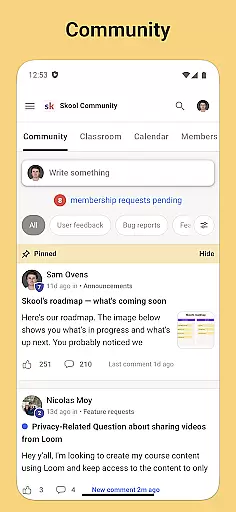

Skool is a dynamic social platform designed to keep users engaged with their online communities while on the move. This app serves as a comprehensive mobile solution that incorporates all essential features for community interaction, learning, and organization. With Skool, users can actively participate in group discussions through posts and comments, ensuring they never miss out on important conversations.
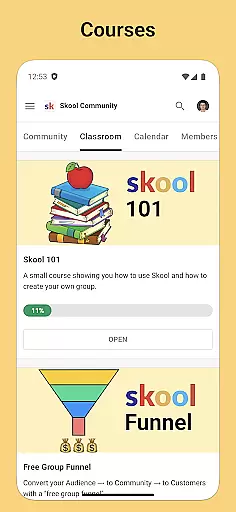
In addition to its community engagement tools, Skool offers an integrated learning experience with courses comprised of video and text-based lessons. Users can enhance their knowledge and skills on the go. The app also includes a calendar feature that keeps users informed about upcoming community events, allowing them to plan their schedules accordingly. Push notifications ensure that users are always up-to-date with the latest activities within their communities.
Skool stands out with its diverse set of features tailored for optimal community involvement and personal growth. One of its core functionalities is the Community section, where users can engage in meaningful discussions through posts and comments. This interactive platform fosters a sense of belonging and encourages active participation from its members.
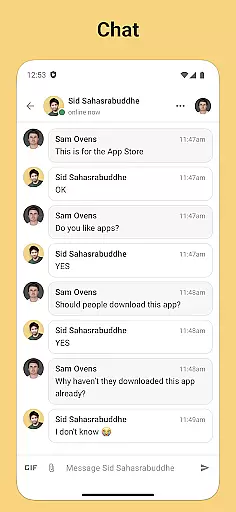
The Courses feature provides an educational dimension, offering both video and text-based lessons. This allows users to learn new topics or deepen existing knowledge at their own pace. Furthermore, the Calendar tool helps users stay organized by highlighting key community events. Coupled with the Chat functionality, which enables direct messaging with any community member, Skool creates a seamless communication experience that empowers users to connect and collaborate effortlessly.
User profile customization is a crucial aspect of any social platform, allowing users to express their individuality and establish their digital identity. Skool offers a comprehensive profile customization feature that enables users to showcase their interests, achievements, and affiliations within their communities.
The app provides various options for personalizing profiles, including the ability to add profile pictures, cover photos, and detailed descriptions. Users can highlight their roles in different communities, making it easier for others to understand their background and interests.
Authenticity verification is equally important in building trust within online communities. Skool implements a robust verification system that helps ensure the credibility of its users. This process involves confirming user identities through multiple checkpoints, which significantly reduces the risk of fake accounts and enhances overall community safety.
By combining extensive customization options with stringent verification processes, Skool creates a secure environment where users can confidently connect and engage with like-minded individuals across various communities.
Discovering new connections is a fundamental feature of social platforms, enabling users to expand their networks and engage with diverse perspectives. Skool excels in this area by offering an intelligent connection discovery system that suggests relevant users based on shared interests, community memberships, and engagement patterns.
The app's recommendation algorithm analyzes user activity, such as participation in discussions, course enrollments, and event attendance, to identify potential valuable connections. This ensures that suggested contacts are not just random users but people who share similar professional or personal interests.
Skool also allows users to search for specific individuals or browse through community member lists, making it easy to find colleagues, classmates, or experts in particular fields. The platform's advanced filtering options enable users to refine their searches based on various criteria, including community affiliation, role, or expertise.
Furthermore, the app facilitates meaningful connections by providing context about potential contacts, such as their contributions to community discussions or their involvement in courses. This information helps users make informed decisions about whom to connect with, leading to more valuable and productive relationships within the Skool ecosystem.
User-friendly interface
Comprehensive community tools
Integrated learning system
Real-time event updates
Instant push notifications
Limited customization options
Occasional notification delays
High data usage
Requires constant internet
Some features need subscription

Video call and chat, live stream and making friends around the world!
 4.60
4.60
This is to support the developer of Infinity for Reddit. No exclusive features.
4.3
Match, chat & date with singles nearby. The dating app to find true love
4.50
Follow the Truth! Join America's leading free-speech social platform.
3.10
Dating & make friend to chat, meet, flirt, and make real connections!
4.60
Instant messaging — simple, fast, secure, and synced across all your devices.
4.00
Message and video call your family and friends!
2.60
A warm, simple dating app for adults seeking real connection.
4.20
TikTok Lite - Designed for speed, simplicity, and saving your phone’s space!
4.40
SuperLive is a super popular video-streaming social network
4.60
This version of Facebook uses less data and works in all network conditions.
4.60
Reddit is where you’ll find your people and feel at home in every conversation.
4.60
A video app from OpenAI - AI video generation by the maker of ChatGPT
4.60
Live Chat & Match! Explore Real-Time Dating and Make Friends!
4.40
Looking for a date or a friend? Swipe to match and meet open-minded singles.
4.20
Sell unwanted items and buy preloved stuff in your local community.
4.10
The video chat to meet people in the blink of an eye!
3.90
Instant video chat with cool people. Live video call & make friends with Monkey!
3.80
Find your next obsession.
3.50


User Reviews